
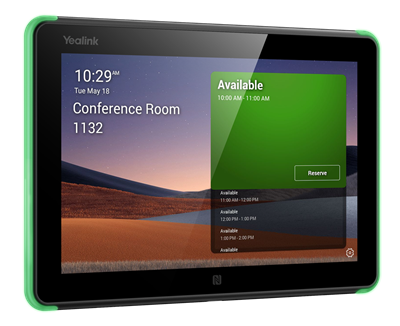
Yealink Room Panel room booking display
RoomPanel E2
 Call our sales team
Yealink RoomPanel E2 — booking panels for the meeting room door that show availability and take a booking on the spot. The eight-inch RoomPanel E2 and the ten-inch RoomPanel Plus E2 run Android 13 and are powered from PoE or from an adapter.
8 inch or 10.1 inch panel
1280 × 800 resolution
Android 13
PoE or 12 V power
RGB availability signalling
NFC and RFID at 13.56 MHz
Order code | Manufacturer model | Display and power | When to choose it |
|---|---|---|---|
1303172 | RoomPanel E2 (this product) | 8 inch, PoE 802.3af or a 12 V adapter | an ordinary meeting room where the panel should show availability and take a booking on the spot |
1303196 | RoomPanel Plus E2 | 10.1 inch, PoE 802.3af/at or DC 12 V / 1.25 A | representative spaces and buildings with broader PoE support in place and a larger display |
The difference in power matters to the designer. The RoomPanel E2 takes PoE class 802.3af and the RoomPanel Plus E2 class 802.3af/at. The PoE switch and the port budget are sized against that.
Key features
The RoomPanel E2 has an 8 inch 16:10 LCD panel at 1280 × 800
The RoomPanel Plus E2 has a 10.1 inch LCD panel at 1280 × 800 with capacitive multi-point touch
Both panels run the Android 13 operating system
Power from PoE or an adapter: class 802.3af and 12 V on the RoomPanel E2, class 802.3af/at and DC 12 V / 1.25 A on the Plus E2
Full RGB LED bars signal room availability and are visible from every side
NFC and RFID at 13.56 MHz
The RoomPanel E2 has a proximity sensor, an ambient light sensor, two microphone arrays, two speakers and a USB-C port
The RoomPanel E2 has a Fast Ethernet 10/100 Mb/s port, 802.11ac Wi-Fi and Bluetooth 5.0
Description
Availability visible from the corridor
The panel hangs by the meeting room door and shows whether the room is free, occupied, or when the next meeting starts. The RGB LED bars are visible from every side, so the room's state can be read from the corridor without anyone stepping up to the display. A booking can be made on the panel itself.
Two sizes and two power classes
The RoomPanel E2 is eight inches and runs on PoE class 802.3af or a 12 V power adapter. The RoomPanel Plus E2 is ten inches and supports PoE class 802.3af as well as 802.3at, plus DC 12 V / 1.25 A. The difference tells where panels go up throughout a building and the load on the PoE switches has to be budgeted.
Mounting on a wall, on glass or into a back box
The RoomPanel E2 supports a surface mount onto an electrical back box, a 20° tilt mount for a wall or glass, a flush mount for a wall or glass, and a mount kit for glass. The RoomPanel Plus E2 mounts either flat or with a 20° tilt. Which kits are in the box, see the section on box contents.
Strengths and limits
Strengths
RGB signalling from every side, so the room's state reads from the corridor without looking at the display
Power from PoE, so the panel needs only one cable at the door
NFC and RFID at 13.56 MHz, leaving room for sign-in with an employee card
The RoomPanel Plus E2 supports five booking platforms, not just Microsoft Teams
Limits and what to tell the customer
We will confirm the box contents of the E2 generation before you order. Our price list lists the kits. Do not carry the kits or a power adapter into the quote as part of the delivery for now.
The PoE classes differ between the two models. The RoomPanel E2 takes 802.3af and the RoomPanel Plus E2 802.3af/at. Check the port budget and the switch power accordingly.
For sizing a PoE switch across many panels, ask us for the power consumption in watts.
The list of supported platforms differs between the models. The RoomPanel E2 supports Microsoft Teams and Zoom Rooms; the RoomPanel Plus E2 Teams, Gingco, Gobright, Flowscape and Space Connect.
The RoomPanel E2 has a Fast Ethernet 10/100 Mb/s port, not a gigabit one. That is enough for the panel itself, but it belongs in the network specification.
The network cable is not addressed in the panel's delivery, so the run to the mounting point has to be prepared in advance.
⚑ atlantis note
Which code to order
For an ordinary meeting room, 1303172 (RoomPanel E2) with its eight-inch display. Where the panel should be larger and power comes from PoE class 802.3at, 1303196 (RoomPanel Plus E2). The Plus model also supports five booking platforms.
Have the mounting kits confirmed
We will confirm the box contents of the E2 generation before you order. Do not write specific mounting kits or a power adapter into the quote as part of the delivery for now. Tell us how the panel will be mounted, that is wall, glass or back box, and we will confirm the delivery contents for that code.
The panel is not the room controller
A RoomPanel handles booking and availability at the door. Control of the meeting inside the room is the job of an MTouch touch controller, and whether the room is genuinely in use is reported by a RoomSensor. These three are routinely confused in quotes.
Prepare the network at the door in advance
The panel needs a cable at the door. If the room is being refurbished, sort the run and the PoE port before the ceiling is closed. Adding a cable to a finished doorway is the most expensive part of any booking panel installation.
Which room it suits
Recommended use | a booking panel for the meeting room door, showing availability and taking bookings on the spot |
|---|---|
Platforms, RoomPanel E2 | Microsoft Teams, Zoom Rooms |
Platforms, RoomPanel Plus E2 | Teams, Gingco, Gobright, Flowscape, Space Connect |
Good fit
A building with several meeting rooms where people hunt for a free one. A Microsoft Teams or Zoom Rooms environment. A customer who already runs a booking system and wants it at the door. Places where availability should be visible from the corridor.
Verify
Which booking system the customer uses and whether it is on the supported list. Whether there is a network socket and a PoE port at the door. What PoE class the switch provides. How the panel will be mounted, that is wall, glass or back box. How many panels the building will have and what the total switch load is.
Consider another model
An MTouch touch controller where the point is controlling the meeting inside the room. A RoomSensor or RoomSensor Pro where the point is measuring how the room is really used. An MVC system or a video bar where the room has yet to receive its video conferencing equipment.
The "Verify" and "Consider another model" cards come from the experience of the atlantis team.
Platforms and modes
Recommended
Microsoft Teams
Both panels support Microsoft Teams. The panel binds to the room calendar, so availability follows the bookings in that calendar.
Microsoft Teams
Other platforms
Zoom Rooms and booking systems
The RoomPanel E2 also runs Zoom Rooms. The RoomPanel Plus E2 additionally supports Gingco, Gobright, Flowscape and Space Connect.
Zoom Rooms
Gingco
Gobright
Flowscape
Space Connect
Take note
The lists differ by model
The platform list is not the same on both panels. Check the platforms for the specific model.
verify per model
Display and power
Parameter | RoomPanel E2 | RoomPanel Plus E2 |
|---|---|---|
Display | 8 inch LCD, 16:10 | 10.1 inch LCD |
Resolution | 1280 × 800 | 1280 × 800 |
Operating system | Android 13 | Android 13 |
PoE power | IEEE 802.3af | IEEE 802.3af/at |
Adapter power | 12 V | DC 12 V / 1.25 A |
Signalling | full RGB LED bars visible from every side | programmable RGB LED background illumination |
Mounting tilt | 20° tilt brackets listed among the mounting options | flat or with a 20° tilt |
Dimensions and weight | 209 × 146 mm, 0.53 kg | 247.6 × 166.36 mm, 0.627 kg |
For sizing a PoE switch across many panels, ask us for the panels' power consumption in watts.
Connectivity and sensors
Interface | RoomPanel E2 | RoomPanel Plus E2 |
|---|---|---|
Wi-Fi | 802.11ac | Wi-Fi 5 |
Bluetooth | 5.0 | 5.0 |
NFC and RFID | 13.56 MHz | NFC and RFID |
What is in the box
In the box
The RoomPanel E2, or RoomPanel Plus E2, booking panel
We will confirm the box contents of the E2 generation before you order
Which mounting kits are in the box, we will confirm before you order
Whether a power adapter is included, we will confirm before you order
We will confirm the delivery contents for a specific code before you order
Not included
A network cable and the cable run to the door
A PoE switch
The booking system and its licences
A RoomSensor
1303111or RoomSensor Pro1303123occupancy sensorThe PrimeCare service programme and the AMS extended warranty
The RoomPanel E2 has mounting options, that is a surface mount onto an electrical back box, a 20° tilt mount for a wall or glass, a flush mount for a wall or glass, and a glass mount kit. These are supported mounting methods, not the box contents.
Order alongside
RoomSensor occupancy sensor1303111
A battery-powered PIR sensor with 120° detection and four-year battery life. It reports whether a booked room is genuinely in use.
RoomSensor Pro occupancy sensor1303123
A mains-powered sensor that also counts people, covers 50 m², offers up to eight detection zones and measures light, temperature and humidity.
Mounting kit for the chosen methodper project
Wall, glass or back box. We will confirm the kit needed for the specific code.
12 V power adapterper project
For places with no PoE port. We will confirm whether an adapter is included before you order.
AMS extended warranty, 1 to 3 years510102001643, 1642 and 1640
For the RoomPanel E2. We hold no separate AMS code for the RoomPanel Plus E2, see the Warranty section.
Variants and the product range
Order code | Manufacturer model | Type | How it differs |
|---|---|---|---|
1303172 ◂ this product | RoomPanel E2 | booking panel | 8 inch, Android 13, PoE 802.3af or 12 V, RGB LED bars, NFC at 13.56 MHz, USB-C port |
1303196 | RoomPanel Plus E2 | booking panel | 10.1 inch, Android 13, PoE 802.3af/at or DC 12 V / 1.25 A, five supported platforms |
1303111 | RoomSensor | occupancy sensor | a battery PIR sensor, Bluetooth 5.0, 120° detection, four-year battery life, magnetic mounting |
1303123 | RoomSensor Pro | occupancy sensor | a mains-powered sensor, people counting, 50 m² coverage, up to eight detection zones, light, temperature and humidity |
What to check before ordering and deploying
Booking system: which one the customer uses and whether it is on the supported list for that model
Power: a PoE port at the door and its class; the RoomPanel E2 takes 802.3af and the Plus E2 802.3af/at
Switch load: how many panels the building will have; ask us for the wattage
Mounting method: wall, glass or back box, and whether a 20° tilt is needed
Delivery contents: we do not yet confirm the mounting kits or an adapter as part of the box, and we will check them
Cable run: whether it is ready at the door; on a refurbishment, sort it before the ceiling is closed
Occupancy sensor: whether a RoomSensor or RoomSensor Pro should go with the panel
Support: the AMS extended warranty, order it with the device
The atlantis team will help with every point. From designing the system and the mounting through configuring the platform and the room account to training the users and handing over documentation. On these panels we will also confirm the E2 generation box contents with your order.
Management and services
Management follows the platform: in native mode the device is managed from the administration of the platform the room runs.
Yealink Management Cloud Service (YMCS): cloud management of Yealink devices, that is bulk firmware updates, status monitoring and alerts. Support and the scope of management differ by model and licence, so check both with us for the specific device and system.
atlantis services for partners
atlantis is a direct importer and distributor, and we deliver projects through a network of specialist partners. The services below are therefore offered to the partner, not to the end customer. The partner sets the scope. On one project we take on the whole delivery, on another we cover just the part the partner currently lacks capacity or specialisation for, and on a third the partner manages alone and uses us only for a consultation.
Before the decision: a consultation on choosing the system and a comparison of the suitable options. The recommendation is built on the size and the character of the room, that is light, acoustics, shape, seating layout and furnishing, then on headcount and on how meetings are actually run there. We offer a live demonstration at our premises, which the partner can bring their customer to, and where it is warranted a test installation, that is a proof of concept.
Delivery and installation: transport, professional mounting and the work that goes with it, that is cabling, installation material, brackets and room alterations. We handle the installation in full, or support the partner's own team where needed.
Network readiness and security: we advise on preparing the network for the demands of two-way real-time video, that is throughput, latency and traffic prioritisation, and on securing the communication.
Configuration and integration: setting up the communication platform and the room account, connecting to the network, and advice on linking and integrating third-party software and hardware.
Training and documentation: training prepared to match the user's role, that is one thing for room users and another for administrators, plus preparation of both project and user documentation.
Service and support after the sale: our certified team in Czech, available to the partner throughout the equipment's life. We handle a warranty claim with the manufacturer on the partner's behalf.
Warranty
The standard warranty on Yealink products is 24 months. On top of it we offer two different things that are easy to confuse.
Extended warranty
AMS
Extends the warranty period, that is how long the customer is entitled to repair or replacement of a faulty unit. The abbreviation stands for Assurance Maintenance Services.
1 to 3 years
Service programme
PrimeCare
Changes how the service is delivered. It covers priority support with escalation during business hours, advance hardware replacement with the unit dispatched the next business day from local European service stock, warranty service aligned with the licence period, the YMCS-Room-Professional package, software updates and access to the Yealink online support centre.
2 to 5 years
Take note
Which one to pick
A customer buys one of them, not both. AMS is enough where a longer warranty is all that is needed, PrimeCare is the choice where room downtime is expensive and the customer needs fast replacement and management. For video products the cap on total warranty is five years, and AMS is bought consecutively, so it must not leave a gap at the end of the existing warranty.
one programme
five-year cap
no gap
Order codes. AMS for the RoomPanel E2 510102001643 for one year, 510102001642 for two years and 510102001640 for three years. We hold no separate AMS line for the RoomPanel Plus E2. PrimeCare is not ordered for booking panels; the programme is tied to the room size class of the MVC, MeetingBar, MeetingBoard and BYOD systems.
FAQ
Are the mounting kits and the power adapter in the box?
The Yealink RoomPanel E2 and RoomPanel Plus E2 supported mounting methods are a surface mount onto an electrical back box, a 20° tilt mount for a wall or glass, a flush mount and a glass mount kit. We will confirm the box contents of the E2 generation before you order, and that includes the power adapter.
What PoE class does the panel need?
The Yealink RoomPanel E2 runs on PoE class IEEE 802.3af or a 12 V adapter. The RoomPanel Plus E2 runs on PoE class IEEE 802.3af/at or DC 12 V / 1.25 A. Ask us for the consumption in watts when sizing a switch across many panels.
Does the panel work only with Microsoft Teams?
No. The Yealink RoomPanel E2 supports Microsoft Teams and Zoom Rooms. The RoomPanel Plus E2 supports five platforms, that is Teams, Gingco, Gobright, Flowscape and Space Connect.
What is the difference between the RoomPanel E2 and the RoomPanel Plus E2?
The Yealink RoomPanel E2 has an 8 inch 16:10 LCD panel, PoE class 802.3af and measures 209 × 146 mm at 0.53 kg. The RoomPanel Plus E2 has a 10.1 inch LCD panel, PoE class 802.3af/at, measures 247.6 × 166.36 mm and weighs 0.627 kg. Both are 1280 × 800 and both run Android 13.
Does the panel know whether the room is really occupied?
The Yealink RoomPanel E2 shows availability from the room calendar and has a proximity sensor and an ambient light sensor. Whether a booked room is genuinely in use is reported by a separate occupancy sensor, that is a RoomSensor 1303111 or a RoomSensor Pro 1303123. Those are not part of the panel's delivery.
Is the panel also the room controller?
No. The Yealink RoomPanel E2 is a booking panel for the door; it handles the availability display and bookings on the spot. The meeting inside the room is controlled by an MTouch touch controller, which is part of the MVC systems. Both belong in the quote separately.
- Manufacturer
- Yealink
- Weight
- 1.17 kg
No attachments available.
Not sure what to choose?
We're happy to help you choose!
Every business day from 8:00 to 17:00