
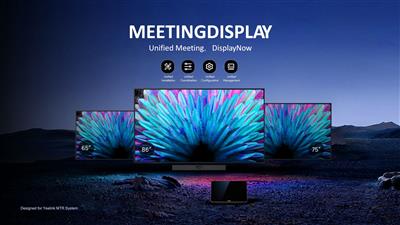
Yealink Meeting Display 75" unique meeting monitor
MD75
 Call our sales team
Yealink MeetingDisplay MD — a professional 4K IPS display for meeting rooms, designed as the screen for Yealink MTR systems, with a bracket for the MCore compute unit in the box. In four sizes of 55, 65, 75 and 86 inches.
A screen for an MTR system, no camera
IPS 3840 × 2160, 10-bit
500 cd/m² brightness, 1200:1 contrast
2 speakers, 12 W
3× HDMI in, no HDMI out
MD55 rated for 7 × 24 h
Order code | Model and size | Duty cycle | When to choose it |
|---|---|---|---|
1203708 | MD55, 55" | 7 × 24 h | a smaller room and anywhere the display has to run continuously, including digital signage |
1203690 | MD65, 65" | 7 × 18 h | an ordinary meeting room |
1203691 | MD75, 75" (this product) | 7 × 18 h | a larger meeting room |
1203692 | MD86, 86" | 7 × 18 h | a large boardroom and a training room |
All four models share the same panel, the same ports and the same equipment. The only parametric difference in the range is the duty cycle: the MD55 is rated for 7 × 24 h, the other three for 7 × 18 h.
Key features
An IPS panel at 3840 × 2160 with 1.07 billion colours, that is 10-bit
500 cd/m² brightness and 1200:1 contrast
Three HDMI inputs
Two 12 W speakers
A bracket for the MCore compute unit in the box, compatible with the MCore 4
Control by infrared remote, over the network with IP control, or over RS232
Wireless mirroring with AirPlay, Miracast and a Wireless Presentation Pod
Android 13, Wi-Fi 6, Bluetooth 5.1 and two LAN ports
Description
A screen for a system, not a conferencing device
The MeetingDisplay is a professional display designed as the screen for Yealink MTR systems. It has no camera, and the box holds a bracket for the MCore compute unit so it can be hidden behind the display. The camera, the microphones and the compute unit therefore come from the system; the display provides the image, the audio and the mounting readiness.
Four sizes, one difference
The range comes in four sizes, 55, 65, 75 and 86 inches, which differ only in size and power draw. The only real parametric difference is the duty cycle: the MD55 is rated for 7 × 24 h, the other three for 7 × 18 h. The MD55 is therefore the only model in the range for continuous operation, for example digital signage in a reception area or on a production floor.
How the display is controlled and what connects to it
The displays are not touch screens. They are controlled with the included infrared remote, over the network with IP control, or over RS232, which matters for integration into a room control system. On the back there are three HDMI inputs, two LAN ports, RS232, USB and a line audio connector. The display has no HDMI output, and that is decisive when the wiring is designed.
Strengths and limits
Strengths
500 cd/m² brightness, that is more than the interactive boards of the MeetingBoard range
The MCore bracket is in the box, so the compute unit hides behind the display without another order
Three HDMI inputs, so a laptop and another source connect alongside the MTR system
IP control and RS232 for integration into a room control system
The MD55 is rated for continuous 7 × 24 h operation
A three-year warranty across the range
Limits and what to tell the customer
The display has no camera and no conferencing microphones. It is a screen for an MTR system and will not serve a room on its own.
The display has no HDMI output, so do not design the wiring around passing the image on.
The display is not a touch screen. Next to the MeetingBoard in the same price list that is confusing, so say it out loud to the customer.
The MeetingDisplay itself carries no platform certification. Teams or Zoom certification is carried by the MCore compute unit, not by the display.
No HDMI cable is in the box, even though the display has three HDMI inputs. The box holds a 3 m AC power cable and a 3 m CAT5E.
⚑ atlantis note
The MD55 is a different product than it looks
The MD55 is the only model in the range rated for 7 × 24 h. Our price list states 18 × 7 for it, an error we are correcting. For the customer it means the MD55 also works for digital signage and for places where the display runs continuously, that is a reception area, a production floor or a shop.
The display belongs in a system, not on its own
The MeetingDisplay has no camera. It belongs in a quote together with a compute unit and a camera, typically with an MVC system or a video bar. The MCore bracket in the box is compatible with the MCore 4, code 1306064 in our range. For a video bar or a camera on the display there are the AV brackets 3311110, 3311111 and 3311112.
Wiring without passing the image on
The display has three HDMI inputs and no output. If the customer has a scenario with a second display or with recording the image, the source has to handle it, not the display. This is the most commonly overlooked point when the wiring is designed.
The warranty is three years
The MeetingDisplay range comes with a three-year warranty, longer than the usual 24 months on other Yealink products. Have it confirmed with us for the specific delivery so you can state it correctly in the quote.
Which room it suits
Recommended use | a screen for Yealink MTR systems |
|---|---|
Duty cycle | MD55 7 × 24 h, MD65, MD75 and MD86 7 × 18 h |
Place in the portfolio | a professional 4K IPS display without a camera and without touch |
Good fit
A meeting room with a Yealink MTR system that needs a professional screen with a ready bracket for the MCore. A room with several image sources, as the display has three HDMI inputs. Integration into a control system over IP control or RS232. On the MD55 also continuous operation and digital signage.
Verify
That the customer understands the display has no camera and no touch. Which compute unit and camera the system contains. How the display will be mounted, as no wall mount is in the box. How many image sources connect and whether passing the image on is needed anywhere. Whether continuous operation is required, which calls for the MD55.
Consider another model
The MeetingBoard Pro or C where the display should be a touch screen with its own camera and microphones. A MeetingBar video bar where the customer already has a display and needs only the conferencing part.
The "Verify" and "Consider another model" cards come from the experience of the atlantis team.
Platforms and modes
Recommended
A screen for an MTR system
The display provides the image and the audio, the system handles the conferencing part. The box holds a bracket for the MCore compute unit, compatible with the MCore 4.
MTR system
MCore bracket in the box
Content sharing
Wireless mirroring
The display shares content over AirPlay, Miracast and a Wireless Presentation Pod, the pod being unavailable in the United States market. A wired source connects to one of the three HDMI inputs.
AirPlay
Miracast
3× HDMI in
Take note
Platform certification
The MeetingDisplay itself carries no Teams or Zoom certification. It is carried by the MCore compute unit, not by the display. In a quote, put it on the right line of the system.
certification sits with the MCore
Display and image
Sizes | 55", 65", 75" and 86" |
|---|---|
Panel type | IPS |
Resolution | 3840 × 2160 |
Brightness | 500 cd/m² |
Contrast | 1200:1 |
Colour depth | 1.07 billion colours, that is 10-bit |
Touch | these displays are not touch screens |
Camera | the display has none, it is intended as the screen for an MTR system |
Duty cycle | MD55 7 × 24 h, MD65, MD75 and MD86 7 × 18 h |
Warranty | 3 years |
Audio
Speakers | 2 × 12 W |
|---|---|
Audio connector | 1× 3.5 mm |
Microphones | the display has none, voice pickup is handled by the system |
Connectivity and control
Video input | 3× HDMI in |
|---|---|
Video output | the display has no HDMI output |
USB | 2× USB-A 2.0, 1× USB-B 2.0 |
Network | 2× RJ45 10/100/1000 Mb/s |
Serial interface | 1× RS232 |
Network control | IP control over LAN |
Wi-Fi | Wi-Fi 6, 2.4 and 5 GHz |
Bluetooth | version 5.1 |
Operating system | Android 13 |
Wireless mirroring | AirPlay, Miracast, Wireless Presentation Pod, which is unavailable in the United States market |
For a mounting design we will confirm the power draw and weight of the individual sizes for the specific size and fixing method.
What is in the box
In the box
The MeetingDisplay in the size ordered
A 3 m AC power cable and a 3 m CAT5E network cable
An infrared remote control and two AAA batteries
A bracket for the MCore compute unit, compatible with the MCore 4
A cable pack, cable ties and a Quick Start Guide
Not included
The wall mount
3311105or a floor stand3311097and3311098An HDMI cable, even though the display has three HDMI inputs
The camera, the microphones and the compute unit, which come from the system
AV brackets for a video bar or a camera
3311110,3311111and3311112The AMS extended warranty
Order alongside
Wall mount3311105
The MD-WallMount kit for mounting the MeetingDisplay on a wall. It is not in the display's box.
Floor stand3311097 or 3311098
The MB-FS-VESA with a shelf, or the MB-FS-Lift with electric height adjustment. Both are listed in our price list for the MeetingDisplay and the MeetingBoard C.
AV bracket for a video bar3311110 or 3311111
The MD-AVBracket-S, listed for the A40, SmartVision 40 and MSpeaker Pro, and the MD-AVBracket-L, listed for the A50. They fix a video bar to the display.
PTZ camera bracket3311112
The MD-PTZBracket for fixing a UVC86 camera to the display.
MCore 4 compute unit1306064
The bracket in the display's box is compatible with the MCore 4. Platform certification is carried by this unit, not by the display.
WPP30 presentation pod1303112
Wireless content sharing from a laptop. The MeetingDisplay supports a Wireless Presentation Pod; we will confirm compatibility of the specific pod with the order.
AMS extended warranty510102001364 and on
For the MD65, MD75 and MD86 we hold AMS for one and two years. We hold no AMS line for the MD55; the codes are in the Warranty section.
Variants and the product range
Model | Camera and touch | Duty cycle | Intended for |
|---|---|---|---|
MeetingDisplay MD55 ◂ this range | no camera, no touch | 7 × 24 h | a smaller room and continuous operation |
MeetingDisplay MD65, MD75, MD86 | no camera, no touch | 7 × 18 h | a meeting room with an MTR system |
MeetingBoard Pro range | three-camera system 3× 50MP, 20-point touch | — | a meeting room where the device should replace the camera and the whiteboard too |
MeetingBoard C range | one camera 50MP, 20-point touch | — | a room in the Google ecosystem, BYOM mode |
MeetingBar A range | 1 to 3 lenses, no display | — | a room where the customer already has a display |
What to check before ordering and deploying
The system: the display has no camera and no microphones, so check what the rest of the system provides
Duty cycle: only the MD55 at 7 × 24 h is rated for continuous operation
Mounting: neither the wall mount
3311105nor a stand is in the boxCompute unit: the bracket in the box is compatible with the MCore 4, so check the unit in the system
Wiring: three HDMI inputs and no output, so the source has to pass the image on
Cabling: no HDMI cable is in the box, order one to suit the cable run
Control and integration: IR remote, IP control or RS232, depending on the room control system
Support: the warranty is three years; order the AMS extended warranty with the device
The atlantis team will help with every point. From designing the system and the mounting through wiring and integration into a control system to training the users and handing over documentation. On the MeetingDisplay we also recommend settling the whole MTR system, because platform certification is carried by the compute unit, not the display.
Management and services
Management follows the platform: in native mode the device is managed from the administration of the platform the room runs.
Yealink Management Cloud Service (YMCS): cloud management of Yealink devices, that is bulk firmware updates, status monitoring and alerts. Support and the scope of management differ by model and licence, so check both with us for the specific device and system.
atlantis services for partners
atlantis is a direct importer and distributor, and we deliver projects through a network of specialist partners. The services below are therefore offered to the partner, not to the end customer. The partner sets the scope. On one project we take on the whole delivery, on another we cover just the part the partner currently lacks capacity or specialisation for, and on a third the partner manages alone and uses us only for a consultation.
Before the decision: a consultation on choosing the system and a comparison of the suitable options. The recommendation is built on the size and the character of the room, that is light, acoustics, shape, seating layout and furnishing, then on headcount and on how meetings are actually run there. We offer a live demonstration at our premises, which the partner can bring their customer to, and where it is warranted a test installation, that is a proof of concept.
Delivery and installation: transport, professional mounting and the work that goes with it, that is cabling, installation material, brackets and room alterations. We handle the installation in full, or support the partner's own team where needed.
Network readiness and security: we advise on preparing the network for the demands of two-way real-time video, that is throughput, latency and traffic prioritisation, and on securing the communication.
Configuration and integration: setting up the communication platform and the room account, connecting to the network, and advice on linking and integrating third-party software and hardware.
Training and documentation: training prepared to match the user's role, that is one thing for room users and another for administrators, plus preparation of both project and user documentation.
Service and support after the sale: our certified team in Czech, available to the partner throughout the equipment's life. We handle a warranty claim with the manufacturer on the partner's behalf.
Warranty
The standard warranty on Yealink products is 24 months. On top of it we offer two different things that are easy to confuse.
Extended warranty
AMS
Extends the warranty period, that is how long the customer is entitled to repair or replacement of a faulty unit. The abbreviation stands for Assurance Maintenance Services.
1 to 3 years
Service programme
PrimeCare
Changes how the service is delivered. It covers priority support with escalation during business hours, advance hardware replacement with the unit dispatched the next business day from local European service stock, warranty service aligned with the licence period, the YMCS-Room-Professional package, software updates and access to the Yealink online support centre.
2 to 5 years
Take note
Which one to pick
A customer buys one of them, not both. AMS is enough where a longer warranty is all that is needed, PrimeCare is the choice where room downtime is expensive and the customer needs fast replacement and management. For video products the cap on total warranty is five years, and AMS is bought consecutively, so it must not leave a gap at the end of the existing warranty.
one programme
five-year cap
no gap
Order codes. AMS for the MD65 510102001364 for one year and 510102001366 for two, for the MD75 510102001370 and 510102001372, for the MD86 510102001375 and 510102001377. We hold no three-year AMS for the MD range and no AMS at all for the MD55. PrimeCare for a MeetingDisplay is ordered against the whole system by room size class, not against the display itself. The MeetingDisplay range carries a three-year warranty.
FAQ
Does the MeetingDisplay have a camera?
No. The Yealink MeetingDisplay has no camera; it is designed as the screen for Yealink MTR systems. The camera, the microphones and the compute unit come from the system, and the display's box holds a bracket so the MCore unit can be hidden behind the display.
Is the display a touch screen?
The Yealink MeetingDisplay range has no touch layer. It is controlled with the included infrared remote, over the network with IP control, or over RS232. For a touch surface the MeetingBoard range is the answer.
Which model handles continuous operation?
In the Yealink MeetingDisplay range it is the MD55, which is rated for 7 × 24 h. The MD65, MD75 and MD86 are rated for 7 × 18 h. It is the only parametric difference inside the range, so choose the MD55 for digital signage and continuous operation.
Does the display have an HDMI output?
No, the Yealink MeetingDisplay has three HDMI inputs and no output. If the customer needs to send the image on, the source has to handle it.
Is the MeetingDisplay certified for Teams or Zoom?
The Yealink MeetingDisplay itself carries no platform certification. It is carried by the MCore compute unit the display is supplied with in an MTR system. In a quote, therefore, put the certification against the unit, not the display.
- Manufacturer
- Yealink
- Weight
- 28.4 kg
No attachments available.
Not sure what to choose?
We're happy to help you choose!
Every business day from 8:00 to 17:00