
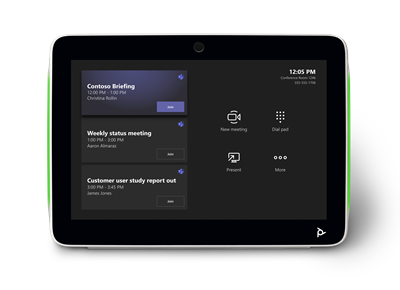
Poly TC10 - white 10" Touch controller
2200-37760-001
 Call our sales team
Poly TC10 — a 10.1" touch panel that serves either as a room scheduling panel by the door or as a video conferencing controller inside the room.
10.1" touch display
Powered over PoE 802.3at, single cable
Room scheduling and call control
Certified for Zoom and Microsoft Teams
White (black variant: 875K5AA)
Order code | Finish | When to choose it |
|---|---|---|
875K5AA | Poly TC10, black | dark interiors, dark door frames, matching the black equipment in the room |
875J5AA#AC3 | Poly TC10, white (this product) | light interiors and white walls where the panel should blend in |
Key features
Touch display with a 10.1" diagonal
Dual use: scheduling panel outside the room, or controller inside it
Power and data over a single cable, PoE to IEEE 802.3at, class 0
802.1X support for controlled network access
Certified for Zoom and for Microsoft Teams
Wall mount kit and table stand included in the box
Description
One device for two different jobs
Poly TC10 can be deployed in two ways and that is its main strength. Mounted by the door it serves as a scheduling panel, showing whether the room is busy and allowing an on-the-spot booking. Placed on the meeting table it serves as the controller for a Poly video conferencing system, that is for starting and running a call. For the customer this means one device type, one stock item and one way of managing both jobs.
One cable and nothing else
The panel takes both power and connectivity from a single network cable over PoE to IEEE 802.3at, class 0. By a door that matters, because it removes the need for a wall socket and the building work that comes with it. Customers with controlled network access will value the 802.1X support, which is a reasonable requirement for a device mounted in a publicly accessible corridor.
Wall, glass or table mounting
Both the wall mount kit and the table stand are in the box, so the two usual installations need no extra order. For mounting on a glass partition, a frequent requirement in meeting rooms with glazed walls, the glass mount kit in the matching colour is ordered separately.
Scheduling and control by platform
The panel is certified for Zoom and for Microsoft Teams. In a Microsoft Teams environment it can be deployed as a controller for Teams on Android when paired with a Poly video system, or installed outside the room as a Microsoft Teams Panel for scheduling. The specific mode is chosen during configuration and we set it up to match the customer's environment.
Strengths and limits
Strengths
Dual role, one stock item covers both scheduling and control
Power and data over one cable, no socket and no building work by the door
Wall mount kit and table stand in the box
802.1X support, suitable for publicly accessible locations
Limits worth telling the customer
The panel requires PoE to IEEE 802.3at. Without PoE at the mounting point it will not start and an injector or switch has to be added.
As a controller it works together with a Poly video conferencing system, it is not a standalone video conferencing device.
Glass mounting requires the separate
874P9AAor874P6AAkit, which is not in the box.The standard manufacturer warranty on this model is one year.
⚑ atlantis note
Colour
This page describes the white finish 875J5AA#AC3; code 875K5AA is the black one. Choose by interior, because a panel in a corridor is a visible decision. Order mounting kits in the same colour.
What is already in the box
The wall mount kit and the table stand are included. The separate codes 874P7AA, 874P8AA and 874P5AA are spare or additional units, for example when a panel is relocated or the mounting method changes. Do not add them automatically to every panel.
Glass
The only mounting accessory genuinely missing from the box is the glass partition kit, 874P9AA in black and 874P6AA in white. For glazed meeting rooms allow for it at design stage.
PoE by the door
The most common complication with scheduling panels is a missing PoE data outlet at the mounting point. Check it during the site survey rather than at installation, otherwise the date slips by an electrician's work.
Two roles and where it fits
Role | Location | Purpose | Mounting |
|---|---|---|---|
Scheduling panel | by the room door | showing availability and booking on the spot | wall kit from the box, glass kit |
Controller | on the meeting table | starting and running calls on a Poly video system | table stand from the box |
Good fit
The customer is standardising meeting room scheduling and video control on one panel type, a Microsoft Teams or Zoom environment, and a PoE data outlet is available.
Check the design
Mounting on a glass partition, missing PoE by the door, the customer's rules on 802.1X and network access from a public corridor, mounting height and orientation. We are happy to review it.
Consider another route
If this is only about controlling video conferencing in the room and not about scheduling, consider a video bar variant that already includes a controller. With Poly Studio X52 that is the 8D8L1AA#ABB kit.
Platforms
Certified
Microsoft Teams
A controller for Microsoft Teams on Android when paired with a Poly video system, or a Microsoft Teams Panel for scheduling outside the room.
Teams Rooms
Teams Panel
Certified
Zoom
Scheduling and running Zoom meetings through the integration with the app.
Zoom
With a Poly system
Video conferencing control
The panel drives a connected Poly video system, it does not run calls on its own.
Poly Studio X
Poly G7500
The mode, scheduling panel or controller, is chosen during device configuration. Setting it up to match the customer's environment is part of our installation service.
Power, network and mounting
The figures match the HP technical specification for order code 875K5AA.
Power | PoE to IEEE 802.3at, class 0 |
|---|---|
Ports | 1× RJ-45, power and data over one cable |
Security | 802.1X support |
Wall mounting | kit included in the box |
Table mounting | stand included in the box |
Glass mounting | optional kit |
Operating environment | 0 to 40 °C, humidity 15 to 80 % |
Specifications
Display | touch, 10.1" diagonal |
|---|---|
Dimensions | 260 × 184 × 64 mm |
Weight | 1.27 kg |
Colour | white |
Platform certifications | Zoom, Microsoft Teams |
Management | Poly Lens |
What's in the box
In the box
Poly TC10
Wall mount kit
Table stand
Mounting hardware
RJ-45 cable
Quick start QR code and warranty card
Not included
Glass mount kit,
874P9AAblack or874P6AAwhitePoE injector or switch, if there is no PoE at the mounting point
A Poly video conferencing system, if the panel is to act as a controller
Order with it
Glass mount kit, black874P9AA
For mounting on a glass partition. Not in the panel box.
Glass mount kit, white874P6AA
The same in white, for panel 875J5AA#AC3.
Spare table stand874P7AA
Only as a spare or additional unit, one stand is in the box.
Spare wall mount kit874P8AA black, 874P5AA white
Only as a spare or additional unit, one kit is in the box.
Variants and accessories
Item | Order code | Finish | In the panel box |
|---|---|---|---|
Panel | |||
Poly TC10 ◂ this product | 875K5AA | black | — |
Poly TC10 | 875J5AA#AC3 | white | — |
Mounting accessories | |||
Table stand | 874P7AA | — | yes |
Wall mount kit | 874P8AA / 874P5AA | black / white | yes |
Glass mount kit | 874P9AA / 874P6AA | black / white | no |
What to check before ordering and installing
Role: scheduling panel by the door, controller on the table, or both across different rooms
PoE: a data outlet with PoE to IEEE 802.3at at the mounting point, checked during the site survey
Surface: wall, glass or table, and for glass order kit
874P9AAor874P6AAColour: black
875K5AAor white875J5AA#AC3, with the mounting kit in the same colourPlatform: Microsoft Teams or Zoom, and for the controller role also the model of the connected Poly system
Accounts: the room account and calendar for scheduling mode, and the tenant rules
Network: VLAN, 802.1X and certificates, access from a publicly available corridor
Placement: mounting height and legibility, and by a door also fire safety and escape route rules
Management: registration in Poly Lens, firmware update before handover
Operation: user training and an acceptance test of both booking and a call
The atlantis team will help with every point. From the site survey through configuring the mode and connecting the calendar to installation and training.
Management and services
Poly Lens: remote inventory, monitoring, diagnostics and bulk software updates
Poly+ Partner: local support in Czech or English from an experienced certified team, by phone, chat, web and video call, expedited device replacement with the manufacturer shipping the replacement part on the next business day and paying the freight, all under the programme terms and for its whole term, so care can continue after the manufacturer warranty ends
atlantis installation and configuration: site survey, delivery, wall, glass or table mounting, mode configuration and calendar connection, network integration, user training and further services on request
Warranty
Standard one-year limited HP Poly warranty. Extended support with expedited device replacement is provided by the Poly+ Partner programme.
Frequently asked questions
Is a mount included in the box?
Yes. The Poly TC10 box contains both the wall mount kit and the table stand. Only the glass mount kit is ordered separately, code 874P9AA in black and 874P6AA in white.
Does Poly TC10 need a power adapter?
No. Poly TC10 takes power and connectivity from a single network cable over PoE to IEEE 802.3at, class 0. The mounting point therefore needs a data outlet with PoE.
What is the difference between 875K5AA and 875J5AA#AC3?
Poly TC10 is the same device in both cases, the difference is the colour. Code 875K5AA is the black finish, 875J5AA#AC3 the white one.
Can one panel be used for both scheduling and control?
Poly TC10 handles both roles, but the mode is chosen during configuration according to where it is placed. One device therefore serves either as a scheduling panel by the door or as a controller in the room.
Does Poly TC10 work as a standalone video conferencing device?
No. In the controller role Poly TC10 drives a connected Poly video system, for example the Studio X range. It does not run calls on its own.
Can the panel be mounted on a glass partition?
Yes, with the glass mount kit. The order code is 874P9AA for the black panel and 874P6AA for the white one, and this kit is not in the panel box.
- Manufacturer
- Poly HP
- Weight
- 1.26 kg
- Wireless technology
- Wi-Fi, Bluetooth 5.0
- Mass
- 1270
- Video conferencing platform
- Microsoft Teams Rooms, Zoom Rooms
- Touchscreen
- 10,1", IPS, Resolution 1280x800, Aspect ratio 16:10, Viewing angle 75°, Desktop tilt 60° or 30°, Brightness 300 cd/m², Contrast ratio 1000
No attachments available.
Not sure what to choose?
We're happy to help you choose!
Every business day from 8:00 to 17:00