
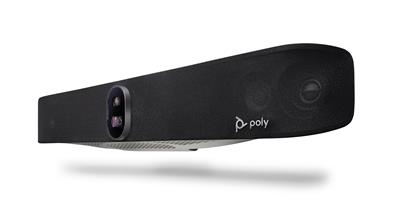
Poly Studio X70 - all-in-one videobar
7200-87290-101
 Call our sales team
Poly Studio X70 — all-in-one video bar with dual cameras for large rooms, with native Microsoft Teams, Zoom and Google Meet and no separate PC required.
Room up to 9.1 × 6.1 m
2× 20 MP camera · 140° and 78°
Microphone pickup up to 7.6 m
Teams · Zoom · Google Meet
Previous generation (current: X72)
Order code | Contents | Note |
|---|---|---|
83Z51AA#ABB | video bar, wall mount kit, 2× HDMI cable, Ethernet cable, AC power adapter (this product) | previous generation, the current model is Studio X72 ( |
Key features
Two 20 MP cameras with a 140° diagonal (wide) and 78° (narrow) field of view
Poly DirectorAI smart camera including the perimeter mode
Four microphones, two MEMS and two second-order, with pickup up to 7.6 m
Speaker array combining mid speakers and tweeters
Native Microsoft Teams, Zoom and Google Meet apps on the device
Two RJ-45 network ports plus line in and line out
Description
One device serves a large room
Poly Studio X70 is intended for large meeting rooms and conference spaces, that is up to roughly 9.1 × 6.1 metres. Cameras, microphones and speakers sit in one unit and meetings run directly on the device, with no computer in the room. Installation means connecting the displays, the network and power, and configuring the platform, the room account and the controls.
Two cameras for two different views
Studio X70 has two 20-megapixel cameras, one with a wide 140° diagonal field of view and one with a narrower 78° view. The wide camera covers the whole room while the narrow one brings the active speaker closer. Poly DirectorAI provides framing of individuals and of the whole group, active speaker tracking and a perimeter mode that limits the captured area so the camera does not frame people outside the meeting space, for example behind a glass wall. Digital zoom is 7.3x and the lens cover is integrated into the body.
Audio for the whole room
Four microphones, two MEMS and two second-order, pick up voices at a range of up to 7.6 metres. The speaker array combines mid speakers with a sensitivity of 83 dB and tweeters with a sensitivity of 89 dB. For unusual rooms there is a line input and a line output.
Teams, Zoom or Google Meet, as the customer chooses
The device runs native apps for Microsoft Teams, Zoom and Google Meet. The platform decision is therefore not a hardware decision: the platform is chosen during configuration and can later be changed in settings. In Poly App mode, standards-based SIP and H.323 up to 6 Mbps are also available. Over USB the video bar serves as camera and audio for a connected laptop.
Strengths and limits
Strengths
The largest recommended room in the whole range, up to 9.1 × 6.1 m
Two cameras with different fields of view and a perimeter mode for glazed rooms
Two RJ-45 network ports, the second can serve another device
Wall mount kit, both HDMI cables, Ethernet cable and power supply are in the box
Limits worth telling the customer
Previous generation. The current model is Studio X72, which we recommend for new projects.
Wi-Fi is to the ac standard, not ax as on Studio X72.
The HDMI outputs are version 1.4; on Studio X72 they are version 2.0.
The video bar is powered by an AC adapter, not over PoE. The touch controller is not in the box. The standard manufacturer warranty is one year.
⚑ atlantis note
Generation
Studio X70 is the previous generation. Offer it where the customer is extending an existing installation and needs matching equipment, or where price decides. For new projects we recommend Studio X72 (A4LZ8AA).
Region
The #ABB suffix is the European variant. Ordering #ABA is the most common mistake with HP products and the two are not interchangeable.
Controls
For native Teams Rooms or Zoom Rooms mode allow for the Poly TC10 touch controller (875K5AA black, 875J5AA#AC3 white). It is not in the video bar box.
Mounting
The wall mount kit is included. VESA mounting (875L2AA) and placement on a table or cabinet (875L3AA) use separate kits. Check the load capacity of the structure: the device weighs 3.2 kg and is over 84 cm wide.
Room fit
Recommended room size | up to 9.1 × 6.1 m (30 × 20 ft) |
|---|---|
Microphone pickup range | 7.6 m |
Number of displays | 2, HDMI 1.4 outputs |
Typical deployment | large conference room, boardroom, training hall |
Good fit
Extending an existing Studio X70 installation, a large room up to 9.1 × 6.1 m, a glazed room where the perimeter mode helps, and projects where price decides against the current generation.
Check the design
A room beyond the recommended size, an irregular floor plan, hard acoustics, load capacity of the structure under the display, a customer requirement for Wi-Fi ax or HDMI 2.0. We are happy to review it.
Consider another model
For new projects we recommend the current Studio X72. For a standard meeting room Studio X52, for a huddle room Studio X32.
Modes of use and platforms
Recommended for a permanent room
Native room system
Meetings run directly on the device, with no computer in the room. The platform is chosen during configuration and can later be changed in settings.
Microsoft Teams
Zoom
Google Meet
For guests and other platforms
USB mode (BYOD)
The video bar appears as a USB camera and audio device for a connected laptop, so a guest uses the application they have on their own device.
Connected over USB
Connecting to infrastructure
Standards-based protocols
Calls over SIP and H.323 up to 6 Mbps in Poly App mode, for connecting to video conferencing infrastructure. We are happy to review the design.
SIP
H.323 up to 6 Mbps
The device always runs in one of these modes, they do not run side by side. Changing the native platform is a configuration step in the device settings, not switching during a meeting.
Connectivity, network and security
The parameters the customer's IT and security teams ask about most often when approving a deployment. The figures match the HP technical specification for order code 83Z51AA.
Interfaces | 1× HDMI input 1.4, 2× HDMI output 1.4 (video), 1× USB-C 5 Gbps, 2× USB-A 5 Gbps, 2× RJ-45, line in, line out |
|---|---|
Network | 1× 10/100/1G Ethernet, Auto-MDIX, IPv4 and IPv6, web proxy basic, digest and NTLM, SCEP, LPR and dynamic bandwidth allocation |
Wi-Fi and Bluetooth | Wi-Fi 802.11a/b/g/n/ac (MIMO), Bluetooth 5.0 |
Media encryption | AES-128 and AES-256 for H.323 and SIP, H.235.6 support |
Management security | authenticated access to admin menus, web interface and APIs, password policy, account and login port lockout, security profiles, secure defaults, remote logging with TLS support, Active Directory external authentication |
Power | external AC adapter with auto sensing |
Operating environment | 0 to 40 °C, humidity 15 to 80 % |
Central management | Poly Lens (cloud): inventory, monitoring, diagnostics, bulk updates |
Camera resolution | 2× 20 MP |
|---|---|
Field of view | 140° diagonal (wide camera), 78° diagonal (narrow camera) |
Zoom | 7.3x digital |
Frame rate | 5 to 30 fps, up to 4K resolution at 15 fps in call |
Smart camera | Poly DirectorAI: people framing, group framing, speaker framing, perimeter mode |
Microphones | 2× MEMS and 2× second-order, pickup up to 7.6 m |
Speakers | sensitivity 83 dB (1 W / 1 m) mid, 89 dB (1 W / 1 m) tweeters |
Lens cover | integrated |
Dimensions and weight | 840.2 × 135.4 × 117.3 mm, 3.2 kg |
What's in the box
In the box
Poly Studio X70
Wall mount kit
2× HDMI cable
Ethernet cable
AC power adapter
Not included
Poly TC10 touch controller (
875K5AA,875J5AA#AC3)VESA mounting kit
875L2AATable stand
875L3AATable microphone
875M6AAPoly+ Partner service programme
Order with it
Poly TC10 touch controller875K5AA / 875J5AA#AC3
For native Teams Rooms or Zoom Rooms mode. Not in the box.
VESA mounting875L2AA
For a VESA pattern up to 800 × 400 mm. Assess the load capacity of the structure separately, against the weight of the device. The box contains a wall mount kit.
Table stand875L3AA
For placement on a table or a cabinet under the display.
Table microphone875M6AA
For irregular rooms, connected to the line input.
HDMI cables of the right lengthper installation
Two cables are included, but in larger rooms they tend to be short.
Variants and products in the range
Model | Recommended room | Camera | Microphone pickup | Power |
|---|---|---|---|---|
Current generation | ||||
Poly Studio X32 | up to 4.6 × 3.0 m | 20 MP, 132° dia. | 4.5 m | PoE++ |
Poly Studio X52 | up to 6.1 × 4.6 m | 20 MP, 110° dia. | 6.09 m | AC adapter |
Poly Studio X72 | up to 8.5 × 4.6 m | 2× 20 MP, 140° and 78° dia. | 7.6 m | AC adapter |
Previous generation (available as an alternative) | ||||
Poly Studio X70 ◂ this product | up to 9.1 × 6.1 m | 2× 20 MP, 140° and 78° dia. | 7.6 m | AC adapter |
What to check before ordering and installing
Generation: whether the customer is extending an existing installation or building a new one. For a new one we recommend Studio X72.
Room: dimensions and depth against the 7.6 m microphone pickup, table shape, position of the most distant participant
Mounting and power: load capacity of the structure under the display, 84 cm width and 3.2 kg weight, wall kit from the box or kit 875L2AA, and a socket by the display, the video bar is not powered over PoE
Acoustics and light: reflective surfaces, air-conditioning noise, backlight from windows, and in glazed rooms consider bounding the framing area
Platform and controls: Teams Rooms, Zoom Rooms or Google Meet, room account and licences, the Poly TC10 touch controller and its PoE
Displays, network and operation: one or two displays and HDMI cables (the outputs are version 1.4), VLAN, firewall and proxy, DNS and NTP, Wi-Fi to the ac standard, current firmware, Poly Lens, the Poly+ Partner programme and an acceptance test
The atlantis team will help with every point. From validating the room design through pre-configuration to installation, integration and on-site training. For large rooms we recommend a consultation before ordering.
Licensing and services
Poly Lens cloud management: remote inventory, monitoring, diagnostics and bulk software updates
Poly+ Partner: local support in Czech or English from an experienced certified team, by phone, chat, web and video call, expedited device replacement with the manufacturer shipping the replacement part on the next business day and paying the freight, all under the programme terms and for its whole term, so care can continue after the manufacturer warranty ends
atlantis installation and configuration: delivery to site, mounting, individual configuration for the customer and the specific room, connection to the communication platform, network integration, interfacing with third-party components, user training, handover documentation and further services on request
Warranty
Standard one-year limited HP Poly warranty. Extended support with expedited device replacement is provided by the Poly+ Partner programme.
Frequently asked questions
What is the difference between Studio X70 and X72?
Poly Studio X72 is the current generation and replaces Studio X70. Both have dual 20 MP cameras with 140° and 78° fields of view; Studio X72 adds Wi-Fi to the ax standard, HDMI 2.0 outputs and an input for an optional microphone. Studio X70 in turn has two RJ-45 network ports.
Is Studio X70 still sold?
Yes, Poly Studio X70 remains in the range as the previous generation. For new projects we recommend Studio X72; X70 makes sense when extending an existing installation or where price decides.
What is the perimeter mode?
Poly DirectorAI Perimeter limits the captured area of the room so the camera does not frame people outside the meeting space, for example behind a glass wall. In glazed rooms that is a practical difference.
Can the video bar be powered over PoE?
No, Poly Studio X70 is powered by the supplied AC adapter. A socket is therefore needed by the display.
- Manufacturer
- Poly HP
- Weight
- 4 kg
- Wireless technology
- Bluetooth, Zigbee, Wi-Fi
- Connection/Interface/Platform
- Zoom, USB PC and MAC, SIP and H.323 standard, Microsoft Teams, USB-C, 2x RJ45 up to 1 Gbps, 2x USB-A
- Microphone range
- 7.6 m
- Camera
- integrated, digital zoom, 120° angle of engagement, 360° field of view, 4K resolution, 140° angle of engagement, 7.3x digital zoom
- Place of use
- Meeting room, School classroom, Lecture hall, Conference hall
- Number of people in the room
- 10 or more people
- Video output
- 2x HDMI
- Video input
- 1x HDMI
- Sharing content from PC and mobile
- Wirelessly, USB cable, Video cable (HDMI, VGA, ..), Apple Airplay, Miracast, Whiteboard feature
- Audio output
- Stereo speakers, 1x 3.5mm jack
No attachments available.
Not sure what to choose?
We're happy to help you choose!
Every business day from 8:00 to 17:00