
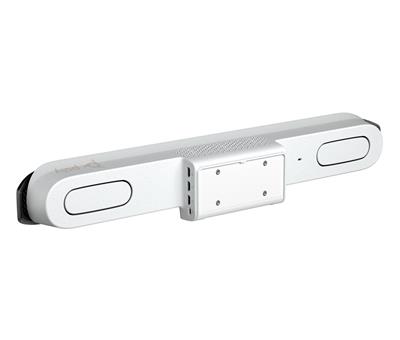
Poly Studio X52,conference system all-in-one
7200-87620-101
 Call our sales team
Poly Studio X52 — all-in-one video bar for medium meeting rooms with native Microsoft Teams, Zoom and Google Meet, no external PC required.
Room up to 6.1 × 4.6 m
20 MP camera · 4K · 110°
Microphone pickup up to 6.09 m
Teams · Zoom · Google Meet
TC10 controller not included (kit with TC10: 8D8L1AA#ABB)
Order code | Contents | When to choose |
|---|---|---|
8D8K2AA#ABB | video bar alone, without controller (this product) | control through the app or the customer's own panel |
8D8L1AA#ABB | video bar + Poly TC10 touch controller | native Teams Rooms or Zoom Rooms with a control panel |
Key features
All-in-one video bar: camera, microphones and speakers in a single unit
20 MP camera with 4K resolution, 110° diagonal (95° horizontal) field of view
Poly DirectorAI smart camera: people and group framing, speaker framing, perimeter mode
Microphone pickup range up to 6.09 m
Native Microsoft Teams, Zoom and Google Meet apps running on the device
Recommended room size up to 6.1 × 4.6 m
Description
A meeting room without a cabinet full of hardware
Poly Studio X52 solves the most common problem of medium meeting rooms: a set of camera, microphones, speakers and a mini PC that has to be installed, wired up and managed. Studio X52 puts all of it into a single device. Installation means connecting a display, the network and power, and configuring the platform, the room account and the controls.
Everyone is seen and heard
The 20-megapixel camera captures in 4K and its 110° diagonal field of view covers a typical meeting room without losing the people at the ends of the table. The Poly DirectorAI smart camera provides automatic people framing and group framing plus speaker framing that follows whoever is talking. The DirectorAI Perimeter mode also defines the boundaries of the captured space, so the camera does not frame people outside the meeting area, for example behind a glass wall. Remote participants see the meeting rather than a static wide shot of the room. Four microphones, two MEMS and two second-order, pick up speech at a range of up to 6.09 metres. Poly NoiseBlockAI and Acoustic Fence suppress unwanted noise.
Teams, Zoom or Google Meet, as the customer chooses
The device runs native apps for Microsoft Teams, Zoom and Google Meet. For the customer this means the platform decision is not a hardware decision. The platform is selected during device configuration and can be changed later in the settings, with no equipment swap. In Poly Video mode the standard SIP and H.323 protocols are also available at up to 6 Mb/s for integration with video conferencing infrastructure. Further applications such as Dialpad, GoToRoom or RingCentral run in Poly Partner Mode; the current list depends on the software version.
Content sharing and laptop connection
Content can be connected by cable through the HDMI input. In Poly Video mode guests share wirelessly over AirPlay or Miracast without installing anything; in native Teams Rooms or Zoom Rooms mode wireless sharing follows that platform. Over USB the video bar can also serve as the camera and audio for a connected laptop.
Strengths and limits
Strengths
All in one unit: no mini PC, no equipment cabinet, one supplier
Three native platforms on one device, the platform decision can wait
Two HDMI outputs for two displays, three in the Zoom environment with a supported adapter
Limits worth telling the customer
For rooms deeper than roughly 6 metres add the 875M6AA table microphone; the built-in microphone pickup range is 6.09 m
The video bar is powered by an AC adapter, not PoE. Only the TC10 touch controller is PoE powered.
For rooms larger than approximately 6 × 4.5 m choose Studio X72 with dual cameras
⚑ atlantis note
Controller
Code 8D8K2AA is the video bar alone, without the touch controller. If the customer needs native Teams Rooms or Zoom Rooms with a control panel, order variant 8D8L1AA, which includes the Poly TC10.
Region
The #ABB suffix is the European variant. Ordering #ABA is the most common mistake with HP products and the two are not interchangeable.
Mounting
The box contains a display mounting clamp. The wall mount (875L8AA) and the VESA mount (875L9AA) are not included and must be ordered separately.
Room sizing
Recommended room size | up to 6.1 × 4.6 m |
|---|---|
Microphone pickup range | 6.09 m |
Number of displays | 2, or 3 in the Zoom environment with a supported adapter |
Typical deployment | meeting room, medium boardroom, classroom |
A good fit
A standard medium meeting room up to 6.1 × 4.6 m, a single platform (Teams, Zoom or Google Meet), a clean installation without a PC and central management via Poly Lens.
Verify the design
A room deeper than 6 m (microphone pickup is 6.09 m, the 875M6AA table microphone helps), a long or irregular table, hard acoustics or unusual display placement. We are happy to review the design.
Consider another model
For larger spaces choose Studio X72 with dual cameras; for small huddle rooms choose Studio X32. See the product series table below.
Usage modes and platforms
Recommended for a permanent room
Native room system
Meetings run directly on the device, with no PC in the room. The platform is selected during configuration and can be changed later in the settings.
Microsoft Teams
Zoom
Google Meet
For guests and other platforms
USB mode (BYOD)
The video bar presents itself as the USB camera and audio of a connected laptop, so a guest uses the application installed on their own device.
USB connection
Infrastructure integration
Standards-based protocols
Calling over SIP and H.323 at up to 6 Mb/s in Poly Video mode, for integration with video conferencing infrastructure. We are happy to review the design.
SIP
H.323 up to 6 Mb/s
The device always runs in one of these modes; they do not run side by side. Changing the native platform is a configuration step in the device settings, not instant switching during a meeting. Further applications such as Dialpad, GoToRoom or RingCentral run in Poly Partner Mode according to the current software version.
Connectivity, network and security
The parameters the customer's IT and security teams ask about most often when approving a deployment. Values follow the HP Poly datasheet and the Poly Video Mode Administrator Guide 4.3.
Interfaces | 1× HDMI 2.0 input (video and audio), 2× HDMI 2.0 output, 1× USB-C, 2× USB-A, 1× RJ-45, 1× input for an optional microphone |
|---|---|
Network | 1× 10/100/1G Ethernet, Auto-MDIX, IPv4 and IPv6, web proxy with Basic, Digest and NTLM |
Network access | 802.1X on the wired LAN (configured in the device administration) |
Wi-Fi and Bluetooth | Wi-Fi 6 (802.11a/b/g/n/ac/ax), Bluetooth 5.0. Wi-Fi as the primary network connection is supported only in Microsoft Teams and Zoom Rooms mode; Poly Video and Google Meet require Ethernet. |
Media encryption | AES-128 and AES-256 for H.323 and SIP, H.235.6 support |
Management security | authenticated access to the admin menus, web interface and API, password policy and account lockout, security profiles, secure defaults, remote logging with TLS support |
Central management | Poly Lens (cloud): inventory, monitoring, diagnostics, bulk updates |
Power and consumption | external AC adapter, 25 W at full load, 8 W in idle |
What is in the box
In the box
Poly Studio X52
Display mounting clamp
HDMI cable
Ethernet cable
Power adapter
Power cable
Not included
Poly TC10 touch controller (included in variant
8D8L1AA)Wall mount
875L8AAVESA mount
875L9AATable microphone
875M6AAPoly+ Partner service programme
Do not forget to order
Poly TC10 touch controller875K5AA
For native Teams Rooms or Zoom Rooms. Alternatively order variant 8D8L1AA straight away.
Wall mount875L8AA
The box only contains the display clamp.
VESA mount875L9AA
For mounting on a VESA arm.
Table microphone875M6AA
For rooms deeper than 6 metres. Pickup range 2.5 m, three-directional pickup, mute button.
HDMI cable of a suitable lengthper installation
Depending on the display distance.
Variants and the product series
Model | Recommended room | Camera | Microphone range |
|---|---|---|---|
Current generation | |||
Poly Studio X32 | up to 4.6 × 3.0 m | 20 MP 4K, 120° | 4.5 m |
Poly Studio X52 ◂ this product | up to 6.1 × 4.6 m | 20 MP 4K, 110° dia. / 95° hor. | 6.09 m |
Poly Studio X72 | up to 8.5 × 4.6 m | dual 20 MP 4K, 70° and 120° | 7.6 m |
Previous generation (available as an alternative) | |||
Poly Studio X30 | up to 4.6 × 3.0 m | 4K, 110° horizontal | 4.5 m |
Poly Studio X70 | up to 9.1 × 6.1 m | dual 4K, 120° and 70° | 7.6 m |
What to verify before ordering and installation
Room: dimensions, table shape and material, position of the farthest participant, ceiling height
Acoustics: reflective surfaces (glass, concrete), HVAC noise, possible need for the 875M6AA table microphone
Light: windows behind participants, backlight, shading options
Platform: Teams Rooms, Zoom Rooms or Google Meet, room account, licence and tenant policies
Control: the TC10 touch controller (PoE 802.3at powered) and its placement, or the 8D8L1AA kit
Displays: one or two, size and viewing distance, mounting height, HDMI cables of a suitable length
Video bar mounting: the display clamp from the box, or the 875L8AA wall mount / 875L9AA VESA mount
Network: LAN and PoE for the TC10 (Wi-Fi as the primary connection only with Teams and Zoom), VLAN, firewall and proxy, DNS and NTP, certificates for 802.1X and the customer's AV policies
Guests: the BYOD USB scenario, wireless sharing over AirPlay and Miracast, the HDMI input for presentations
Operations: up-to-date firmware, Poly Lens registration, the Poly+ Partner programme, user training and a handover test
The atlantis team can help with every single item. From validating the room design through device pre-configuration to on-site installation, integration and training, see Licences and services below. For borderline rooms we recommend a consultation before ordering.
Licences and services
Poly Lens, cloud management: remote inventory, monitoring, diagnostics and bulk software updates
Poly+ Partner: technical support by phone, chat, web and video call, advance device replacement with prepaid next-business-day shipping, subject to the programme terms
atlantis installation and configuration: delivery to site, mounting, configuration tailored to the customer and the specific room, connection to the communication platform, integration into the network environment for real-time audio and video, integration with third-party hardware and software, on-site training for users and administrators, handover documentation and further services on request
Warranty
Standard one-year HP Poly limited warranty. Extended support with expedited device replacement is provided by the Poly+ Partner programme.
Frequently asked questions
Do I need a separate PC for the Studio X52?
No, Poly Studio X52 does not need a separate PC in native mode. The Teams, Zoom and Google Meet apps run directly on the device. A laptop is only needed in USB mode, when the video bar is used as its camera and audio.
Can I use Teams, Zoom and Google Meet on the X52?
Poly Studio X52 is certified for all three platforms, but the native mode is always configured for one of them. Changing the platform is a configuration step in the device settings, not switching during a meeting. A guest meeting on a different platform is handled by USB mode with the guest's laptop.
Is the touch controller included?
Not with code 8D8K2AA#ABB, which is the video bar alone. The Poly TC10 controller is included in the 8D8L1AA#ABB kit.
Is a mount included?
The Poly Studio X52 box contains a display mounting clamp. The wall mount (875L8AA) and the VESA mount (875L9AA) are not included.
What room size does the X52 suit?
The recommended room size for Poly Studio X52 is roughly 6.1 × 4.6 metres and the microphones pick up speech at up to 6.09 m. For a deeper room add the 875M6AA table microphone; for a considerably larger space choose Studio X72.
Can the video bar be powered over PoE?
No, Poly Studio X52 is powered by an AC adapter. Only the TC10 touch controller is powered over PoE (IEEE 802.3at class 0).
- Manufacturer
- Poly HP
- Weight
- 5 kg
- Wireless technology
- Bluetooth, Zigbee
- Connection/Interface/Platform
- Zoom, USB PC and MAC, SIP and H.323 standard, Microsoft Teams, USB-C, 1x RJ45 up to 1 Gbps, 2x USB-A (3.0), Google Meet
- Execution
- Compact Video Bar
- Microphone range
- 6 m
- Camera
- integrated, 5x digital zoom, 360° field of view, 4K resolution, 95° engagement angle
- Place of use
- Small meeting room, Meeting room, School classroom
- Number of people in the room
- Approximately up to 10 people
- Video output
- 2x HDMI
- Video input
- 1x HDMI
- Sharing content from PC and mobile
- Video cable (HDMI, VGA, ..), Apple Airplay, Miracast, Whiteboard feature
- Audio output
- Stereo speakers
- Package contents
- Display holder, Poly Studio X52, HDMI cable, Power supply, Ethernet cable, Camera cover
No attachments available.
Not sure what to choose?
We're happy to help you choose!
Every business day from 8:00 to 17:00