
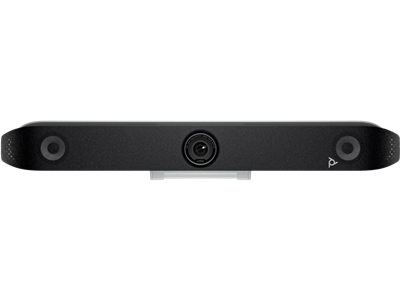
Poly Studio V52 USB Video Bar EMEA - INTL English
 Call our sales team
Poly Studio V52 — a USB video bar for medium meeting rooms where the meeting is run by the connected laptop and the customer does not want a room system or licences.
Medium room, microphone pickup up to 6.09 m
20 MP camera · 110° diagonal field of view
4 microphones, two of them second-order directional
Single USB-C connection, no native apps
Power adapter included
Order code | Contents | Note |
|---|---|---|
A09D4AA#ABB | video bar, monitor clamp, privacy cover, AC adapter and power cable, USB-C cable and HDMI cable (this product) | white finish, power supply included |
Key features
USB video bar for medium meeting rooms, camera, microphones and speakers in one body
20 MP camera, 110° diagonal field of view, 5× digital zoom
Poly DirectorAI smart camera including the perimeter function
Four microphones, two digital MEMS and two second-order directional, pickup up to 6.09 m
Connects to the computer with a single USB-C cable, no drivers to install
Power adapter, monitor clamp, privacy cover and cables included
Overview
A meeting room without a room system
Poly Studio V52 is a USB video bar for medium meeting rooms. It connects to a laptop with a single USB-C cable and the meeting runs in whatever application the user has on their computer. The customer buys no licences, manages no room account and is not tied to a single communication platform. For meeting rooms with frequent external visitors that is a practical solution.
It looks like a Studio X52 and behaves differently
Studio V52 shares its body and dimensions with the Poly Studio X52, but it is a different type of product. It has no native Teams, Zoom or Google Meet application and does not sign in to a room account. It is always the camera, microphones and speakers of the connected computer. The behaviour of the connectors follows from that, see Connectivity and power. If the customer wants a room system, that is the Studio X range.
Video and audio for a medium room
The 20 megapixel camera with a 110° diagonal field of view covers a standard meeting room. The Poly DirectorAI smart camera frames individuals and the whole group, tracks the active speaker and can set a perimeter so that the camera ignores activity outside the room, for example behind a glass wall. The microphone array combines two digital MEMS microphones with two second-order directional microphones and picks up voices up to 6.09 metres away.
Power and installation
Unlike the Studio V12, the power adapter is included, the device draws 37 VA. The box also contains a monitor clamp, a privacy cover, a USB-C cable and an HDMI cable. The device is registered and managed through Poly Lens.
Strengths and limits
Strengths
Platform independent, works with any application on the user's laptop
No licences and no room account to manage
Strong microphone array with second-order directional microphones, pickup up to 6.09 m
DirectorAI including the perimeter function, useful in glass-walled meeting rooms
Power adapter and cables are included
Limits and what to tell the customer
This is not a room system. The meeting is always run by the connected computer, the device has no native apps and no room account.
The connectors do not behave like the Studio X52. Per the HP specification the HDMI input is not supported, the HDMI outputs are for provisioning support only and the USB-A ports are disabled by default.
The device ships in white, the Studio X range is black.
The camera has digital, not optical zoom. The standard manufacturer warranty is one year.
⚑ atlantis note
V or X
This is the most common mix-up in the whole category. Studio V52 has no native apps and is always the audio and camera of a laptop. Studio X52 is a room system with native Teams, Zoom and Google Meet and its own room account. The two devices share practically the same body, so the difference is not visible in a photo. Confirm with the customer which one they actually want before ordering.
HDMI and USB-A
The presence of connectors does not mean they work as they would on a room system. Per the HP specification the HDMI input is not supported, the HDMI outputs are for provisioning support only and the USB-A ports are disabled by default and can be enabled in the Poly Lens app. Do not design the V52 in where the display feed is meant to run through the video bar.
Colour
Poly Studio V52 ships in white, unlike the black Studio X range. Where meeting rooms have a unified look, flag this in advance.
Mounting
A monitor clamp is included. For wall, stand or floor-stand mounting we will recommend a suitable kit for the specific installation, just ask.
Room fit
Manufacturer positioning | medium rooms |
|---|---|
Microphone pickup range | 6.09 m |
Mode of operation | always through the connected computer, no room account |
Typical deployment | meeting room for six to ten people, training room, shared meeting space |
Good fit
A medium meeting room where users run meetings from their own laptops, different applications depending on the other party, a requirement for deployment without licences and without managing a room account.
Check the design
Room depth against the 6.09 m pickup range, how the display feed is handled, hard acoustics, glass walls and backlight, laptop position relative to the video bar. We are happy to assess it.
Consider another model
Studio V12 for a small room, Studio V72 for a large space. If the customer wants a room system with its own account and native apps, that is the Studio X52.
How it is used
The only mode of operation
Cabled to a laptop
The device appears as a USB camera, microphone and speaker. The meeting runs in whatever application the user has on their computer, with no drivers to install.
USB-C
Manufacturer certifications
Certified platforms
Certified for Microsoft Teams and Zoom. Over USB it also works with other communication applications.
Microsoft Teams
Zoom
What Studio V52 does not have
No native application
It has no native Teams, Zoom or Google Meet and does not sign in to a room account. That is what the Studio X52 does.
not a room system
Drive the in-room display from the laptop, not through the video bar. Per the HP specification the Studio V52 HDMI outputs are for provisioning support only and the HDMI input is not supported.
Connectivity and power
The figures match the HP technical specification for order code A09D4AA.
Computer connection | 1× USB-C |
|---|---|
HDMI | 2× HDMI 2.0 output, per the HP specification for provisioning support only; 1× HDMI 1.4 input, not supported |
USB-A | 2× USB-A, disabled by default, can be enabled in the Poly Lens app |
Other connectors | 1× RJ-11, 1× RJ-45 |
Power | external AC adapter, 37 VA. The adapter is included. |
Wi-Fi and Bluetooth | Wi-Fi 802.11ax MIMO, Bluetooth 5.0. Use as a wireless audio sink for a computer or phone is not supported. |
Management | Poly Lens |
Video and audio
Camera resolution | 20 MP |
|---|---|
Field of view | 110° diagonal |
Zoom | 5× digital zoom |
Frame rate | 30 frames per second |
Smart camera | Poly DirectorAI: people framing, group framing, speaker tracking, perimeter |
Microphones | 2× digital MEMS and 2× second-order directional, pickup up to 6.09 m |
Speaker | sensitivity 79 dB |
Dimensions and weight | 769.5 × 115.2 × 103 mm, 2.54 kg |
Colour | white |
What is in the box
Included
Poly Studio V52
Monitor clamp
Privacy cover
AC adapter and power cable
USB-C to USB-C cable
HDMI cable
Not included
Wall, stand or floor-stand mounting kit
USB extension if the laptop sits further from the video bar
Display and its mount
Poly+ Partner service programme
Order together
Mounting solutionper installation
Only the monitor clamp is included. We will recommend a wall kit, stand or floor stand for the specific room.
USB cabling to the user positionper installation
The included cable may not reach if the laptop sits at the far end of the table. We will propose a suitable extension.
atlantis installation and trainingservice
Room assessment, mounting, computer setup and a handover test.
Variants and products in the range
Model | Positioning | Camera | Microphone pickup | Native apps |
|---|---|---|---|---|
Studio V range, USB video bars | ||||
Poly Studio V12 | small room | 20 MP, 132° dia. | 4.57 m | no |
Poly Studio V52 ◂ this product | medium meeting room | 20 MP, 110° dia. | 6.09 m | no |
Poly Studio V72 | large room | 2× 20 MP, 140° and 78° dia. | 7.62 m | no |
Studio X range, room systems with native apps | ||||
Poly Studio X32 | huddle room | 20 MP, 132° dia. | 4.5 m | yes |
Poly Studio X52 | medium meeting room | 20 MP, 110° dia. | 6.09 m | yes |
Poly Studio X72 | large meeting room | 2× 20 MP, 140° and 78° dia. | 7.6 m | yes |
What to check before ordering and installing
Type of solution: whether the customer wants a USB video bar or a room system with its own account. That is the difference between the V52 and the X52.
Display feed: it has to come from the laptop, the V52 HDMI outputs are for provisioning support only
Room: depth against the 6.09 m pickup range, position of the most distant participant, acoustics, glass walls and backlight
Laptop and applications: USB-C port and cable length against the user's position, setting the default camera, microphone and speaker on users' computers
Mounting and colour: the monitor clamp from the box, or a wall, stand or floor-stand kit, white finish against the black Studio X range
Operation: registration in Poly Lens, firmware update before handover, enabling the USB-A ports if needed, training and a handover test
The atlantis team can help with every point. From assessing the room through pre-configuration to on-site installation and training.
Management and services
Poly Lens: inventory, monitoring, diagnostics, firmware updates and device settings including enabling the USB-A ports
Poly+ Partner: local support in Czech or English from an experienced certified team, by phone, chat, web and video call, expedited device replacement with the manufacturer shipping the replacement part on the next business day and paying the freight, all under the programme terms and for its whole term, so care can continue after the manufacturer warranty ends
atlantis installation and configuration: delivery to site, mounting, individual configuration to the customer's needs and the specific room, setting up connected computers, firmware updates, operator training and other tailored services
Warranty
Standard one-year HP Poly limited warranty. Extended support with expedited device replacement is provided by the Poly+ Partner programme.
Frequently asked questions
What is the difference between Poly Studio V52 and X52?
The body is practically the same but it is a different type of product. Studio V52 is a USB video bar, the meeting is always run by the connected computer. Studio X52 is a room system with native Teams, Zoom and Google Meet applications and its own room account. Studio V52 also ships in white.
Can I drive the meeting room display through the Studio V52?
Not this way. Per the HP specification the HDMI outputs are for provisioning support only and the HDMI input is not supported. Drive the display from the laptop.
Why do the USB-A ports not work?
Per the HP specification they are disabled by default. They can be enabled in the Poly Lens app.
Is a power supply included?
Yes. Unlike the Poly Studio V12, the Studio V52 ships with an AC adapter and a power cable.
- Manufacturer
- Poly HP
- Weight
- 2.54 kg
- Camera
- 360° field of view
No attachments available.
Not sure what to choose?
We're happy to help you choose!
Every business day from 8:00 to 17:00