
Poly Studio G62 Video Conferencing System No local
 Call our sales team
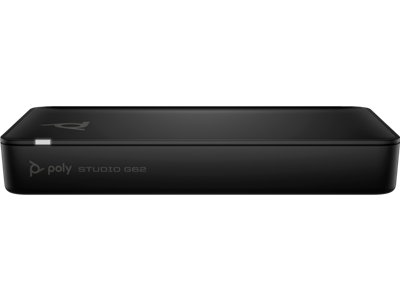
Poly Studio G62 — the compute unit of a modular video conferencing system for large and unconventional rooms. You choose the camera, microphones and speakers to suit the space.
Modular system, camera and audio are added
Up to two displays over HDMI
Up to three IP microphone arrays
PoE+ powered, injector not included
Certified for Microsoft Teams and Zoom
Order code | Contents | Note |
|---|---|---|
99T09AA#AC3 | compute unit, Ethernet cable and HDMI cable (this product) | base variant without the mounting plate |
A01KCAA#AC3 | compute unit with mounting plate kit, Ethernet cable and HDMI cable | for mounting under a table, on a wall or in a rack |
Key features
Compute unit of a modular system, camera and audio chosen to suit the room
Two HDMI 2.0 outputs for video, HDMI 2.0 input and USB-C input with DisplayPort Alt Mode for content sharing
Support for up to three IP microphone arrays
Poly DirectorAI smart camera: people and group framing, presenter tracking, speaker framing, perimeter
PoE+ powered, no separate power adapter
Wi-Fi 802.11ax MIMO and Bluetooth 5.1, managed through Poly Lens
Overview
A system assembled around the room
Poly Studio G62 is a compute unit, not an all-in-one video bar. A small or medium meeting room is well served by a Studio X video bar with everything in one body. As soon as the room stops being a box with a single table, meaning large halls, classrooms, boardrooms with a long table or spaces with an unusual layout, the camera and microphones need to go where they make sense. That is exactly what the G62 is for.
What connects to it
Compatible devices are the Poly Studio E70 and Poly Studio E60 cameras, the Poly Studio E360 companion camera, the Poly Studio R30 video bar and Poly IP table and ceiling microphones. The unit supports IP, USB and HDMI cameras and the connection of third-party components. Up to three IP microphone arrays can be attached. The system is operated with the Poly TC10 touch controller.
Video and content sharing
Two HDMI 2.0 outputs drive two displays. For sharing content from a laptop there is an HDMI 2.0 input and a USB-C input with DisplayPort Alt Mode that handles 4K at 30 Hz over two lanes. Video runs at up to 30 frames per second at resolutions up to 4K.
One cable for power
The G62 is powered over PoE+, from a switch compliant with IEEE 802.3at or 802.3bt class 4, 5 or 6, or from a PoE injector. That means a single cable to the unit. Neither the injector nor the switch is included, so power has to be resolved at design stage.
Strengths and limits
Strengths
Camera and microphones go where the room needs them, not where a video bar can reach
Up to three IP microphone arrays cover a long table or an irregular space
Two displays and two content sharing paths, HDMI and USB-C
One cable to the unit, power and network over PoE+
Compact body 247.7 × 152.4 × 34.9 mm weighing 798 g, easy to hide under a table or behind a display
Limits and what to tell the customer
The box contains only the unit, an HDMI cable and an Ethernet cable. Camera, microphones, speakers and the touch controller are not included.
PoE+ power is not included. An 802.3at or 802.3bt class 4, 5 or 6 switch, or a PoE injector, is required.
This is a tailored solution. Room design, camera choice and microphone placement take more time than deploying a video bar.
The standard manufacturer warranty is one year.
⚑ atlantis note
A quote never ends with the G62
The unit on its own does not run a meeting. A quote always needs a camera, microphones, speakers or room audio, a TC10 touch controller, displays and PoE+ power. We are happy to put the whole configuration together from the room's floor plan, just send us the dimensions and the table layout.
Which code to order
99T09AA#AC3 is the base variant. A01KCAA#AC3 is the same unit with a mounting plate kit, useful when the unit is mounted under a table, on a wall or in a rack. Both codes have identical box contents, but the package dimensions differ. If you need the mounting plate, order A01KCAA#AC3.
When G62 and when Studio X
For a standard meeting room a Studio X52 or X72 video bar is simpler and cheaper. The G62 makes sense where one video bar cannot cover the space, meaning halls, classrooms, boardrooms with a long table or rooms where the camera has to sit away from the display.
Network
The unit has a LAN port with PoE+ and a separate LLN port for connecting components. Go through the network split and switch configuration with the customer's IT before installation.
Room fit
Manufacturer positioning | large and unconventional rooms designed to order |
|---|---|
Camera | optional, IP, USB or HDMI |
Microphones | up to three IP microphone arrays |
Displays | two HDMI 2.0 outputs |
Typical deployment | hall, classroom, boardroom with a long table, irregular space |
Good fit
A large or unconventional room where the camera and microphones need to be placed independently of the display, a requirement for two displays, a long table, integration with room audio.
Check the design
Floor plan and table layout, number and placement of microphones, camera choice, PoE+ availability, cable routes, unit placement. We are happy to design the whole configuration.
Consider another model
An all-in-one Studio X52 or X72 video bar for a standard meeting room. The Studio V range for BYOD without a room account.
Platforms and operation
Manufacturer certifications
Microsoft Teams and Zoom
The system is certified for Microsoft Teams and Zoom and is also compatible with Google Meet.
Microsoft Teams
Zoom
Poly's own mode
SIP and H.323
In Poly App mode the system handles SIP and H.323 calls up to 6 Mbps. Suitable for customers with their own video conferencing infrastructure.
SIP
H.323
Control
Poly TC10 touch controller
The system is operated with the Poly TC10 touch panel, which also handles room scheduling. It is not included.
Poly TC10
The smart camera functions, meaning people and group framing, presenter and speaker tracking and the perimeter, are delivered by the system together with a connected Poly camera.
Connectivity and power
The figures match the HP technical specification for order code 99T09AA.
Video output | 2× HDMI 2.0 (video) |
|---|---|
Video input | 1× HDMI 2.0; 1× USB-C 5 Gbps with DisplayPort Alt Mode for video input, 2 lanes, 4K at 30 Hz |
USB | 2× USB-A 5 Gbps |
Audio | 1× line in, 1× line out |
Microphones | up to three IP microphone arrays |
Network | 1× LAN RJ-45 with PoE+ 802.3at class 4, 1× LLN RJ-45, speeds 100 Mbps, 1 Gbps and 2.5 Gbps |
Power | PoE+, a switch compliant with IEEE 802.3at or 802.3bt class 4, 5 or 6, or a PoE injector. Not included. |
Wireless | Wi-Fi 802.11a/b/g/n/ac/ax MIMO, Bluetooth 5.1 |
Network features | IPv4, IPv6, Auto-MDIX, SIP and H.323 up to 6 Mbps in Poly App mode, Polycom Lost Packet Recovery, reconfigurable MTU size, web proxy (basic, digest, NTLM), REST and CLI API, SCEP |
Security | 802.1x support |
Management | Poly Lens |
Specifications
Frame rate | 30 frames per second at resolutions up to 4K |
|---|---|
Smart camera | people framing, group framing, presenter tracking, speaker framing, perimeter |
Operating system | Android |
Dimensions and weight | 247.7 × 152.4 × 34.9 mm, 798 g |
Colour | black |
Sustainability | 80 % post-consumer recycled plastic, at least 20 % recycled metal, recyclable packaging |
Operating environment | 0 to 40 °C, humidity 15 to 80 % |
Certifications | CB, FCC, IC, RCM, VCCI, UL/CSA, CE, WEEE, UKCA, MIC |
What is in the box
Included
Poly Studio G62
HDMI cable
Ethernet cable
Warranty card
With order code A01KCAA#AC3 also a mounting plate kit
Not included
Camera. Poly Studio E70, E60, E360 or the R30 video bar.
Microphones. Poly IP table or ceiling microphones, up to three arrays.
Speakers or room audio.
Poly TC10 touch controller.
PoE+ power. Switch or injector.
Displays and their mounts, Poly+ Partner service programme
Order together
Poly Studio E70 camera842F8AA
Two 20 MP cameras with 140° and 78° fields of view, for the wide shot and the close-up.
Poly Studio E60 camera9W1A6AA#AC3
PTZ camera with 12× optical zoom for long rooms.
Poly TC10 touch controller875K5AA
Meeting control and room scheduling. Without a controller the system is awkward to operate.
Poly IP microphonesper design
Table or ceiling, up to three arrays. We will propose the count and placement from the floor plan.
PoE+ powerper installation
An 802.3at or 802.3bt class 4, 5 or 6 switch, or a PoE injector. Without power the unit will not start.
Variants and products in the range
Solution | Type | Camera and audio | Positioning |
|---|---|---|---|
Poly Studio G62 ◂ this product | modular room system | optional components | large and unconventional rooms |
Poly Studio X72 | all-in-one room system | built in | large meeting room |
Poly Studio X52 | all-in-one room system | built in | medium meeting room |
Poly Studio X32 | all-in-one room system | built in | huddle room |
Poly Studio V52 | USB video bar without a room account | built in | medium meeting room, BYOD |
What to check before ordering and installing
Completeness of the configuration: camera, microphones, speakers, TC10 controller, displays and power. The unit alone is not enough.
Power: an 802.3at or 802.3bt class 4, 5 or 6 switch, or a PoE injector. Not included.
Floor plan and displays: table layout, number and placement of microphone arrays, camera position relative to the display, one or two displays, resolution, HDMI cable lengths and routes
Sharing and unit placement: sharing over HDMI, USB-C or both, unit under a table, behind a display or in a rack; for mounting, order the code with the mounting plate
Network and platform: separation of the LAN and LLN ports, VLANs, 802.1x and certificates agreed with the customer's IT in advance, Teams Rooms, Zoom Rooms, Google Meet or Poly App mode with SIP and H.323
Operation: registration in Poly Lens, firmware update before handover, operator training and a handover test with a real call
The atlantis team can help with every point. With modular systems the design is the most important part, so go through it with us before ordering.
Management and services
Poly Lens: inventory, monitoring, diagnostics and firmware updates for the whole configuration
Poly+ Partner: local support in Czech or English from an experienced certified team, by phone, chat, web and video call, expedited device replacement with the manufacturer shipping the replacement part on the next business day and paying the freight, all under the programme terms and for its whole term, so care can continue after the manufacturer warranty ends
atlantis design, installation and configuration: configuration design from the floor plan, delivery to site, mounting, cabling, individual configuration, network setup, firmware updates, operator training and other tailored services
Warranty
Standard one-year HP Poly limited warranty. Extended support with expedited device replacement is provided by the Poly+ Partner programme.
Frequently asked questions
Is a camera or a microphone included?
No. The box contains only the compute unit, an HDMI cable, an Ethernet cable and a warranty card. Camera, microphones, speakers and the touch controller are ordered separately.
What is the difference between 99T09AA#AC3 and A01KCAA#AC3?
A01KCAA#AC3 is the same unit with a mounting plate kit, useful for mounting under a table, on a wall or in a rack. 99T09AA#AC3 is the base variant without it.
Which cameras can be connected?
Compatible devices are the Poly Studio E70, Poly Studio E60, the Poly Studio E360 companion camera and the Poly Studio R30 video bar. The unit supports IP, USB and HDMI cameras and third-party components.
When to choose the G62 and when a Studio X video bar?
For a standard meeting room an all-in-one Studio X video bar is simpler. The G62 makes sense in large halls, classrooms, boardrooms with a long table and anywhere the camera and microphones have to be placed independently of the display.
- Manufacturer
- Poly HP
- Weight
- 0.8 kg
- Camera
- 360° field of view
No attachments available.
Not sure what to choose?
We're happy to help you choose!
Every business day from 8:00 to 17:00