
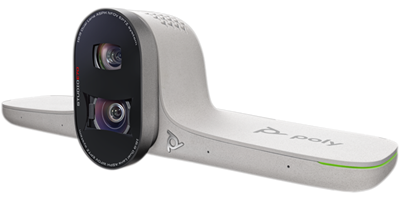
Poly Studio E70 - 2x 20 megapixel 4K lens
2200-87090-001
 Call our sales team
Poly Studio E70 — a dual-lens smart camera for large and unconventional rooms. The wide shot and the close-up at the same time. Conference audio is handled by a separate device.
Two 20 MP cameras
140° and 78° diagonal field of view
7.3× digital zoom
Poly DirectorAI including perimeter
USB-C or network connection with PoE
Order code | Contents | Note |
|---|---|---|
842F8AA | camera, wall mount kit, Ethernet cable and USB-A to USB-C cable (this product) | white finish, no microphones or speakers |
Key features
Two 20 MP cameras in one body
140° and 78° diagonal fields of view, the overall shot and the close-up
7.3× digital zoom
Poly DirectorAI: speaker framing, people framing, group framing, perimeter
Integrated lens cover
Connects with a single USB-C cable, network port with PoE support
802.1x security and certificate management
Overview
Two cameras instead of one
Poly Studio E70 has two lenses. One with a 140° diagonal field of view captures the whole room, the other with a narrower 78° diagonal field of view brings more distant participants closer. The Poly DirectorAI smart camera switches between them according to who is speaking. In a long room that is the difference between the other party seeing a general view of the table and seeing the speaker's face.
A camera, not a complete system
Studio E70 is a standalone camera. Microphones and speakers for room audio are not part of this order code, so room audio has to be handled separately, either with IP microphones and room audio in a Poly Studio G62 modular system, or with an audio device in a USB deployment. We are happy to design the whole configuration.
Two deployment paths
The camera has one USB-C port and one RJ-45 network port. USB-C connects it to a compute unit or a computer, the network port provides PoE power and management. The camera is compatible with the Poly Studio G62 modular system.
Perimeter
The DirectorAI perimeter function bounds the area from which the camera picks participants for automatic framing. That is useful in glass-walled meeting rooms and open spaces where the camera would otherwise frame people walking past behind the glass. It is not an image mask or a privacy control; video outside the area is not switched off.
Strengths and limits
Strengths
Two lenses, the wide view and the close-up without a compromise
DirectorAI including the perimeter function
Compact body 321 × 102 × 89.1 mm weighing 907 g
Wall mount kit, Ethernet cable and USB cable are included
Integrated lens cover, no separate clip-on part
Limits and what to tell the customer
This is not a complete system. The camera has no speakers and its microphones do not carry call audio, audio has to be handled separately.
We will confirm with your order whether a power adapter is in the box. Plan for PoE power, or ask us to confirm which adapter to order for the installation.
The zoom is digital, not optical. For very long rooms consider the Studio E60 PTZ camera.
White finish against the black Studio X range. The standard manufacturer warranty is one year.
⚑ atlantis note
The camera alone is not enough
A quote always needs audio as well, meaning microphones and speakers, and for a room system also a compute unit and a controller. A typical configuration is Poly Studio G62 + Studio E70 + IP microphones + room audio + TC10. We are happy to put it together from the floor plan.
Power
The camera can be powered over PoE per 802.3af class 3 or from an external 12 V supply. It does not, however, list a power adapter among the box contents. Plan for PoE in the design, or get in touch and we will confirm power for the specific installation.
E70 or E60
E70 has two lenses and digital zoom, suited to wide rooms where the whole table has to be covered. E60 is a PTZ camera with 12× optical zoom, suited to long rooms and halls that need real magnification. Large spaces often use both.
Mounting
A wall mount kit is included. Placement above the display, below it or on a stand changes the viewing angle, so go through it with us at design stage.
Room fit
Product type | standalone smart camera, no microphones or speakers |
|---|---|
Fields of view | 140° and 78° diagonal |
Connection | USB-C to a compute unit or computer, RJ-45 for PoE power and management |
Typical deployment | large meeting room, hall, classroom, spaces with a Poly Studio G62 modular system |
Good fit
A wide room where the whole table has to be covered while still bringing the speaker closer, glass-walled meeting rooms that need a perimeter, configurations with the Poly Studio G62.
Check the design
Power source, camera placement relative to the display and windows, the audio solution, USB-C cable length and route, backlight. We are happy to assess it.
Consider another model
The Studio E60 PTZ camera with 12× optical zoom for very long rooms. An all-in-one Studio X video bar for a standard meeting room, where camera and audio are in one body.
How it is used
Recommended deployment
With a modular system
The camera connects to a Poly Studio G62 compute unit, which handles the call, the audio and the controls. The camera is compatible with that system.
Poly Studio G62
Manufacturer certifications
Certified platforms
Certified for Microsoft Teams and Zoom.
Microsoft Teams
Zoom
What the camera does not have
No conference audio
The built-in microphones of the camera serve as a source of sound direction for camera tracking, not as an audio path. The camera has no speakers. Room audio has to be handled separately.
audio separate
Connectivity and power
The figures match the HP technical specification for order code 842F8AA.
Ports | 1× USB-C 5 Gbps, 1× RJ-45 |
|---|---|
Power | input 100 to 240 VAC, 50/60 Hz, 1.5 A; output 12 VDC, 5 A, 60 W; or PoE per 802.3af, 15.4 W, class 3. Power supply type: external. We will confirm with your order whether an adapter is in the box. |
Security | 802.1x support, certificate management |
Management | Poly Lens |
Operating environment | 0 to 40 °C, humidity 15 to 80 % |
Video
Cameras | 2× 20 MP |
|---|---|
Field of view | 140° and 78° diagonal |
Zoom | 7.3× digital |
Smart camera | Poly DirectorAI with speaker framing, people framing, group framing, perimeter |
Lens cover | integrated |
Dimensions and weight | 321 × 102 × 89.1 mm, 907 g |
Colour | white |
What is in the box
Included
Poly Studio E70
Wall mount kit
Ethernet cable
USB-A to USB-C cable
Not included
Microphones and speakers. Room audio is handled separately.
Compute unit and controller for a room system deployment.
Power. Plan for PoE, we will confirm with your order whether an adapter is in the box.
Stand or alternative mounting, Poly+ Partner service programme
Order together
Poly Studio G62 compute unit99T09AA#AC3
For deployment as a room system with its own room account.
Poly TC10 touch controller875K5AA
Meeting control and room scheduling.
Room audioper design
IP microphones and room audio. The camera neither captures nor plays audio.
Powerper installation
PoE per 802.3af class 3, or an external 12 V supply. We will confirm it for the installation.
Variants and products in the range
Model | Type | Resolution | Field of view | Zoom |
|---|---|---|---|---|
Poly Studio E70 ◂ this product | dual-lens smart camera | 2× 20 MP | 140° and 78° dia. | 7.3× digital |
Poly Studio E60 | PTZ camera | 2× 8 MP | 78.1° dia. (PTZ) | 12× optical |
Poly EagleEye IV 12x | PTZ camera for legacy codecs, mini HDCI interface | not stated | not stated | 12× |
What to check before ordering and installing
Audio: the camera neither captures nor plays audio, microphones and speakers belong in the quote
Power: availability of PoE per 802.3af class 3 at the mounting point
What it connects to: a Poly Studio G62 compute unit, or a computer over USB-C
Placement: above or below the display, height and viewing angle; a wall mount kit is included
USB-C cable: length and route from the camera to the unit or computer
Light: backlight from windows, reflections on glass
Perimeter: glass walls and the traffic behind them
Network: PoE port, VLANs, 802.1x and certificates with the customer's IT
Management: registration in Poly Lens, firmware update before handover
Operation: handover test with a real call and a framing check
The atlantis team can help with every point. From configuration design through mounting to framing setup and training.
Management and services
Poly Lens: inventory, monitoring, diagnostics and firmware updates
Poly+ Partner: local support in Czech or English from an experienced certified team, by phone, chat, web and video call, expedited device replacement with the manufacturer shipping the replacement part on the next business day and paying the freight, all under the programme terms and for its whole term, so care can continue after the manufacturer warranty ends
atlantis design, installation and configuration: configuration design from the floor plan, delivery to site, mounting, cabling, framing and perimeter setup, firmware updates, operator training
Warranty
Standard one-year HP Poly limited warranty. Extended support with expedited device replacement is provided by the Poly+ Partner programme.
Frequently asked questions
Does the Studio E70 have microphones or speakers?
Microphones and speakers for room audio are not part of this order code. It is a standalone camera, room audio has to be handled separately.
Why does it have two lenses?
One with a 140° diagonal field of view captures the whole room, the other with a narrower 78° diagonal field of view brings more distant participants closer. Poly DirectorAI switches between them according to who is speaking.
Is a power supply included?
We will confirm with your order whether a power adapter is in the box. The box contains the camera, a wall mount kit, an Ethernet cable and a USB-A to USB-C cable. Plan for PoE power per 802.3af class 3, or get in touch and we will confirm the solution for the specific installation.
What does the camera connect to?
Over USB-C to a compute unit or a computer. The network port provides PoE power and management. The camera is compatible with the Poly Studio G62 modular system.
When to choose the E70 and when the E60?
The E70 has two lenses and digital zoom, suited to wide rooms. The E60 is a PTZ camera with 12× optical zoom for long rooms and halls that need real magnification.
What is the perimeter function?
DirectorAI perimeter bounds the area from which the camera picks participants for automatic framing. It is useful in glass-walled meeting rooms where the camera would otherwise frame people walking past behind the glass. Video outside the area is not switched off; this is not a privacy control.
- Manufacturer
- Poly HP
- Weight
- 1.51 kg
- Accessory type
- Camera
No attachments available.
Not sure what to choose?
We're happy to help you choose!
Every business day from 8:00 to 17:00