
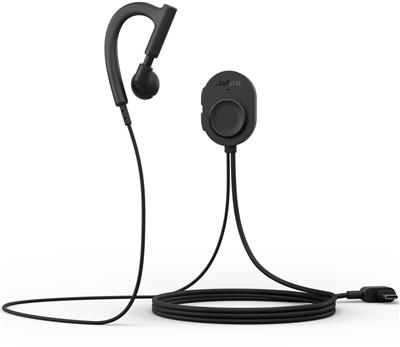
Jabra Perform 10, Mono USB-C, Black
 Call our sales team
Jabra Perform 10 — a corded mono behind-the-ear headset with a USB-C connector and a push-to-talk button on the cable, for retail teams that communicate through apps on Android devices and handhelds.
USB-C cable
Push-to-talk on the cable
Android only
Mono, behind the ear
Main unit 35 g
USB-HID and CDC
Order code | Variant | Connector | Platform | Colour |
|---|---|---|---|---|
5121-119 | Perform 10, USB-C, Black, Android only (this product) | USB-C | Android only | black |
We carry the Perform 10 in a single variant, the Android-only version. The wireless headsets of the Perform range have their own pages.
Key features
USB-C cable, 1.16 m long, for a direct connection to an Android device
Walkie Talkie in Microsoft Teams, Zello and Zebra Workcloud Sync, 3 named PTT apps
Works with PTT apps over USB-HID and CDC
ECM microphone with a range of 70 Hz to 10 kHz
Main unit 35 g, earpiece 7.8 g
Worn behind the ear, on the left or right ear
Description
Push-to-talk straight from the cable
The Jabra Perform 10 is a corded USB-C headset for push-to-talk in retail teams. It connects by a USB-C cable directly to an Android device or handheld, without Bluetooth pairing. The PTT button sits on an in-line control on the cable, and the control has a clothing clip.
The apps the team already uses
The headset works with the Walkie Talkie app in Microsoft Teams, Zello and Zebra Workcloud Sync, and generally with PTT apps that use USB-HID and CDC. Firmware and settings are managed through Jabra Direct and Jabra Xpress.
A light mono behind-the-ear headset
The Perform 10 is a mono behind-the-ear headset, worn on the left or right ear. The main unit weighs 35 grams and the earpiece alone 7.8 grams. The ECM microphone is uni-directional, with a sensitivity of −38 dBV/Pa and a range of 70 Hz to 10 kHz.
Strengths and limits
Strengths
Corded connection directly to the device, no pairing
Walkie Talkie in Teams, Zello and Zebra Workcloud Sync
Support for PTT apps over USB-HID and CDC
Worn on the left or right ear
Limits and what to tell the customer
Code 5121-119 is the Android-only version. For other devices, check with us.
The headset is corded. The device must have a USB-C port and the user carries it; the cable is 1.16 m long.
The headset is mono, intended for team communication, not for focused work.
⚑ atlantis note
Device first, headset second
The Perform 10 with code 5121-119 is the Android-only version. Before the order, ask the customer for the device or handheld model and confirm it has a USB-C port. For other devices, check with us.
The PTT app decides
The headset works with Walkie Talkie in Microsoft Teams, Zello and Zebra Workcloud Sync and with PTT apps over USB-HID and CDC. If the customer uses a different app, check with us, ideally on a sample.
The box holds just the headset
The box contains the headset with its cable and in-line control, plus documentation. There are no further accessories in the box; the headset plugs straight into the device.
Who it suits
Recommended use | push-to-talk in retail teams, the headset corded to an Android device or handheld |
|---|---|
Place in the portfolio | the Jabra Perform range for push-to-talk and team communication, the only corded model |
Platform | Android devices and handhelds |
Good fit
A shop floor where the team uses Android handhelds and a PTT app. Operations that want to avoid pairing headsets over Bluetooth.
Verify
The device model and its USB-C port. Which PTT app the customer uses. Whether users are fine with a cable between the headset and the device.
Consider another model
The Perform 45 SE or Perform 75 for a wireless Bluetooth connection. The Perform Go 4 for drivers and mobile workers who mainly make calls.
The "Verify" and "Consider another model" cards come from the experience of the atlantis team.
Platforms and PTT apps
To the device
By USB-C cable
A direct connection to an Android device or handheld, with a 1.16 m cable.
USB-C
Android
PTT apps
Teams, Zello, Zebra
Walkie Talkie in Microsoft Teams, Zello and Zebra Workcloud Sync, and generally PTT apps over USB-HID and CDC.
Teams Walkie Talkie
USB-HID and CDC
Management
Jabra Direct and Xpress
Firmware updates and headset settings through Jabra Direct and Jabra Xpress.
Jabra Direct
Jabra Xpress
Audio, microphone and controls
Type | corded mono behind-the-ear headset, either ear |
|---|---|
Microphone | ECM, uni-directional |
Microphone sensitivity | −38 dBV/Pa |
Microphone range | 70 Hz to 10 kHz |
Controls | PTT button on the in-line control, clothing clip |
Cable | USB-C, 1.16 m |
Weight | main unit 35 g, earpiece 7.8 g |
What is in the box
In the box
Perform 10 headset with USB-C cable and in-line control
Warnings and declarations
Safety information and warranty
Not included
An Android device or handheld
The PTT app, which runs on the customer's device
Variants and the product range
Model | Connection | Wearing | Intended for |
|---|---|---|---|
Jabra Perform 10 ◂ this product | USB-C cable | behind the ear, in-line control | push-to-talk, Android only |
Jabra Perform 45 SE | Bluetooth 5.3 | behind the ear | push-to-talk in retail |
Jabra Perform 75 | Bluetooth 5.3 | headband, optional neckband | push-to-talk, shift work |
Jabra Perform Go 4 | Bluetooth 5.3 | behind the ear | calling on the move, drivers and mobile workers |
What to check before ordering and deploying
Platform: code 5121-119 is the Android-only version
Device port: the device or handheld must have USB-C
PTT app: Walkie Talkie in Teams, Zello, Zebra Workcloud Sync; check any other app with us
Cable: 1.16 m long, the user carries the device
Wearing: mono behind the ear, on the left or right ear
Controls: the PTT button is on the in-line control with a clothing clip
Management: firmware and settings through Jabra Direct or Jabra Xpress
Pilot: test compatibility with the device and the app on a sample
The atlantis team will help with every point. With the Perform 10 the usual questions are compatibility with the customer's device and with their PTT app. Both are settled fastest on a sample, which we will lend.
Management and services
Jabra Direct: the manufacturer's free application for Windows and macOS. It updates firmware, adjusts device settings such as sidetone or hearing protection, and handles call control in softphones.
Jabra Plus: cloud management of Jabra devices for IT, that is scheduled bulk firmware updates, configuration, status monitoring and inventory. Support and the scope of management differ by model, so check both with us for the specific device and deployment.
atlantis services for partners
atlantis is a direct importer and distributor, and we supply through a network of specialist partners. The services below are therefore offered to the partner, not to the end customer. The partner sets the scope, according to their own capacity and skills, from a consultation alone to taking on the whole deployment.
Before the decision: a consultation on the model and the order code and a comparison of the suitable variants. We base the recommendation on the user's role, because a contact centre agent, a manager on the move and a shared workstation each need a different headset. We arrange a sample to try so the customer can check comfort, audio and range before ordering for a whole team.
Deployment and configuration: bulk settings and management of the headsets, connection to the communication environment, and advice on linking third-party software and hardware.
Training and documentation: training prepared to match the user's role, plus preparation of the user documentation.
Service and support after the sale: our certified team in Czech, available to the partner throughout the equipment's life. We handle a warranty claim with the manufacturer on the partner's behalf.
Warranty
The standard Jabra warranty on this product is 2 years from the date of purchase.
Included
Manufacturer's warranty
At its discretion the manufacturer repairs or replaces a faulty unit, or refunds the purchase price. We handle the claim with the manufacturer on the partner's behalf.
2 years
Service plan
Jabra Care
It speeds up support and replacements under warranty, it does not extend the warranty. It comes in two levels, Advanced and Ultimate, which differ in support availability and replacement speed. It is bought for one year and requires registration.
Advanced
Ultimate
Take note
Wear parts
The warranty does not cover cables, ear cushions, head and neck bands, pouches, stands, power adapters and removable batteries. A part that stops working within 14 days of purchase is treated as faulty at purchase.
wear parts
14 days
FAQ
Which devices does the Perform 10 work with?
The Jabra Perform 10 with code 5121-119 is the Android-only version, for devices and handhelds with a USB-C port. For other devices, check with us.
Which PTT apps does the headset work with?
The Jabra Perform 10 works with Walkie Talkie in Microsoft Teams, Zello and Zebra Workcloud Sync, and generally with PTT apps over USB-HID and CDC. If the customer uses a different app, check with us.
Does the headset need pairing?
The Jabra Perform 10 is a corded headset that connects by a USB-C cable directly to the device, so there is no Bluetooth pairing. The cable is 1.16 m long.
Where is the push-to-talk button?
The Jabra Perform 10 has the PTT button on the in-line control on the cable. The control has a clip for attaching it to clothing.
Which ear is the headset worn on?
The Jabra Perform 10 is a mono behind-the-ear headset worn on the left or right ear. The main unit weighs 35 grams and the earpiece 7.8 grams.
How is the headset managed?
The Jabra Perform 10 is managed through Jabra Direct and Jabra Xpress, covering firmware updates and settings. Details are in the Management and services section.
- Manufacturer
- Jabra
- Weight
- 0.041 kg
- Headset type
- Wireless
- Wireless technology
- Zigbee
No attachments available.
Not sure what to choose?
We're happy to help you choose!
Every business day from 8:00 to 17:00