
 Call our sales team
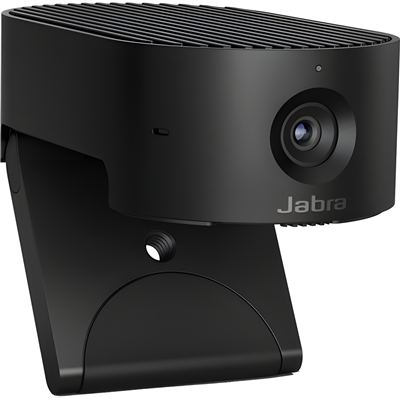
Jabra PanaCast 20 — a personal 4K webcam with a USB-C connection, Intelligent Zoom and Vivid HDR, background effects processed in the camera itself and an integrated privacy cover.
4K at 30 fps
13 MP sensor
117° diagonal field of view
3 MEMS microphones
Integrated privacy cover
USB-C, USB-A cable in the box
Order code | Version | Connection | Also in the box |
|---|---|---|---|
8300-119 | PanaCast 20 (this product) | USB-C on the camera, USB-C to USB-A cable 1.5 m | carry case |
We carry the PanaCast 20 under a single order code. The camera has a USB-C connector, the cable in the box ends in a USB-A connector. For laptops with USB-C only we carry an adapter, see Order alongside.
Key features
13 MP sensor, 4K resolution at 30 frames per second
Field of view of 90° horizontal, 75° vertical and 117° diagonal
Intelligent Zoom and up to 3x lossless digital zoom at 720p
Vivid HDR, Picture-in-Picture and background effects processed in the camera
Three MEMS microphones with a range of 100 Hz to 8 kHz
Integrated privacy cover, weight 136 g
Description
A personal 4K camera for the monitor
The Jabra PanaCast 20 is a webcam for video calls by a single user. The 1/3.2 inch sensor with a resolution of 13 MP delivers a 4K 3840 × 2160 image, or 1080p or 720p, always at 30 frames per second. The field of view is 90° horizontal and 117° diagonal. The camera attaches to a monitor with a clip; for standing it on a desk a table stand is available as an accessory.
Image processing in the camera itself
The camera offers Intelligent Zoom and up to 3x lossless digital zoom at 720p resolution. Vivid HDR and Picture-in-Picture are available, and background effects are processed on the device. The camera is certified for Microsoft Teams and Zoom and carries the Works With Chromebook label. An SDK is available for developers.
Microphones yes, speaker no
The camera has three MEMS microphones with a sensitivity of −37 dBFS and a range of 100 Hz to 8 kHz. It has no speaker, so listening is handled by the computer, a headset or a speakerphone. The integrated privacy cover closes the lens whenever needed. It connects through a USB-C connector and supports both USB 3.0 and USB 2.0.
Strengths and limits
Strengths
4K resolution and a 13 MP sensor in a camera weighing 136 g
Background effects are processed in the camera, not in the computer
The privacy cover is part of the body and cannot get lost
Carry case in the box for work on the road
Limits and what to tell the customer
The camera has no speaker. Another device has to handle listening.
The zoom is digital, lossless up to 3x only at 720p resolution.
The cable in the box ends in a USB-A connector. A laptop with USB-C only needs adapter
14208-14.The table stand is not in the box, only the monitor clip is.
⚑ atlantis note
Check the laptop ports in advance
The camera has a USB-C connector, and the box holds a 1.5 m USB-C to USB-A cable to the USB 3.0 standard. If the customer's laptops have USB-C ports only, add adapter 14208-14 to the order, that is a USB-A socket to a USB-C plug.
Cover audio in the quote straight away
The PanaCast 20 has microphones but no speaker. For calls with several people at a desk it makes sense to offer a Speak2 speakerphone with the camera, for a single user a headset.
Camera on the desk
If the camera is to stand on the desk or next to a laptop rather than on a monitor, we carry the PanaCast Table Stand 14207-56.
Who it suits
Recommended use | video calls by a single user at a desk and on the road |
|---|---|
Place in the portfolio | personal USB camera of the Jabra PanaCast range |
Certification | Microsoft Teams, Zoom, Works With Chromebook |
Good fit
A desk with an external monitor, a user with frequent video calls, working from home, a user who carries the camera with a laptop, and a Microsoft Teams or Zoom environment.
Verify
Which ports the laptops have, for the adapter. What the user will listen through, since the camera has no speaker. Whether the camera will sit on the monitor or on the desk, for the stand.
Consider another model
The PanaCast U30 for a small room where several people sit at one screen. The PanaCast 50 for a meeting room with a 180° view.
The "Verify" and "Consider another model" cards come from the experience of the atlantis team.
Camera and image
Sensor | 13 MP, 1/3.2 inch |
|---|---|
Resolution | 4K 3840 × 2160, 1080p and 720p, always at 30 fps |
Field of view | 90° horizontal, 75° vertical, 117° diagonal |
Zoom | Intelligent Zoom, up to 3x lossless digital at 720p |
Image functions | Vivid HDR, Picture-in-Picture, on-device background effects |
Privacy | integrated privacy cover |
Audio, connection and build
Microphones | 3 × MEMS, sensitivity −37 dBFS |
|---|---|
Microphone frequency range | 100 Hz to 8 kHz |
Speaker | none |
Interface | USB-C, both USB 3.0 and USB 2.0 |
Cable in the box | USB-C to USB-A, 1.5 m, USB 3.0 |
Mounting | monitor clip, table stand as an accessory |
Dimensions | 44 × 25 × 80 mm |
Weight | 136 g |
What is in the box
In the box
PanaCast 20 camera
Carry case
USB-C to USB-A cable, 1.5 m
Not included
Table stand, separately
14207-56Adapter for a USB-C port, separately
14208-14
Order alongside
PanaCast Table Stand14207-56
For placing the camera on the desk instead of on the monitor.
Jabra USB-A Adapter14208-14
USB-A socket to USB-C plug. For connecting the supplied cable to a laptop with USB-C ports only.
Variants and the product range
Model | Type | Intended for |
|---|---|---|
Jabra PanaCast 20 ◂ this product | personal 4K USB camera | a single user at a desk and on the road |
Jabra PanaCast U30 | USB video bar with a 4K camera and a 120° field of view | small room for up to six people, the user's laptop |
Jabra PanaCast 50 | USB video bar with three cameras and a 180° view | meeting room |
Jabra PanaCast 40 VBS | Android video bar with a 180° view | huddle room and small meeting room |
Jabra PanaCast 55 VBS | Android video bar with three cameras | medium-sized meeting room |
What to check before ordering and deploying
Laptop ports: the cable in the box ends in USB-A, for USB-C adapter
14208-14Listening: the camera has no speaker, add a headset or a speakerphone
Placement: the monitor clip is in the box, the table stand
14207-56is notPlatform: certified for Microsoft Teams, Zoom and Works With Chromebook
Zoom: digital, lossless up to 3x only at 720p
USB standard: the camera supports both USB 3.0 and USB 2.0
Number of people: the camera is meant for a single user, for a group offer a video bar
Warranty extension: Warranty+ is ordered only together with the device, see the Warranty section
The atlantis team will help with every point. With the PanaCast 20 the things most often forgotten are the adapter for USB-C laptops and the fact that the camera has no speaker. Both are best included in the quote from the start.
Management and services
Jabra Direct: the manufacturer's free application for Windows and macOS. It updates firmware, adjusts device settings such as sidetone or hearing protection, and handles call control in softphones.
Jabra Plus: cloud management of Jabra devices for IT, that is scheduled bulk firmware updates, configuration, status monitoring and inventory. Support and the scope of management differ by model, so check both with us for the specific device and deployment.
atlantis services for partners
atlantis is a direct importer and distributor, and we supply through a network of specialist partners. The services below are therefore offered to the partner, not to the end customer. The partner sets the scope, according to their own capacity and skills, from a consultation alone to taking on the whole deployment.
Before the decision: a consultation on the model and the order code and a comparison of the suitable variants. We base the recommendation on the user's role, because a contact centre agent, a manager on the move and a shared workstation each need a different headset. We arrange a sample to try so the customer can check comfort, audio and range before ordering for a whole team.
Deployment and configuration: bulk settings and management of the headsets, connection to the communication environment, and advice on linking third-party software and hardware.
Training and documentation: training prepared to match the user's role, plus preparation of the user documentation.
Service and support after the sale: our certified team in Czech, available to the partner throughout the equipment's life. We handle a warranty claim with the manufacturer on the partner's behalf.
Warranty
The standard Jabra warranty on this product is 2 years from the date of purchase.
Included
Manufacturer's warranty
At its discretion the manufacturer repairs or replaces a faulty unit, or refunds the purchase price. We handle the claim with the manufacturer on the partner's behalf.
2 years
Extension
Jabra Warranty+
It extends the warranty period, not its scope, and starts when the standard warranty ends. It is bought only together with the device, at the time of purchase, and cannot be ordered later. The customer receives an e-mail confirmation from the manufacturer listing the serial numbers.
at purchase only
Take note
Wear parts
The warranty does not cover cables, ear cushions, head and neck bands, pouches, stands, power adapters and removable batteries. A part that stops working within 14 days of purchase is treated as faulty at purchase.
wear parts
14 days
Warranty+ order codes by length of extension. 1 year 830X-39891, 2 years 830X-39892, 3 years 830X-39893. It is ordered in the same order as the device.
FAQ
Does the camera have a speaker?
The Jabra PanaCast 20 has no speaker. It has three MEMS microphones, so listening is handled by the computer, a headset or a speakerphone.
How do I connect the camera to a laptop with USB-C only?
The Jabra PanaCast 20 has a USB-C connector on the body, and the cable in the box ends in a USB-A connector. For a laptop with USB-C ports only we carry adapter 14208-14, that is a USB-A socket to a USB-C plug.
Is the zoom optical?
The Jabra PanaCast 20 has a digital zoom. It is lossless up to 3x at 720p resolution. The Intelligent Zoom function is also available.
Which platforms is it certified for?
The Jabra PanaCast 20 is certified for Microsoft Teams and Zoom and carries the Works With Chromebook label.
How is the camera mounted?
The Jabra PanaCast 20 attaches to a monitor with a clip. For standing it on a desk we carry the PanaCast Table Stand 14207-56, which is not in the box.
How is privacy handled?
The Jabra PanaCast 20 has an integrated privacy cover that closes the lens. Background effects are also processed in the camera itself.
- Manufacturer
- Jabra
- Weight
- 0.23 kg
- Wireless technology
- Zigbee
- Connection/Interface/Platform
- Zoom, Microsoft Teams, USB-C
- Execution
- USB Video Bar for PC
- Camera
- 360° field of view
- Place of use
- Home office, Office, Small meeting room, Meeting room
- Number of people in the room
- Individual
- Video output
- 1x display device
No attachments available.
Not sure what to choose?
We're happy to help you choose!
Every business day from 8:00 to 17:00