
 Call our sales team
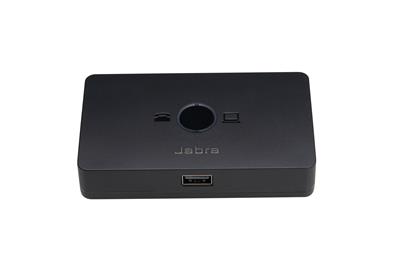
Jabra Link 950 — a switching adapter that connects a Jabra USB headset to a desk phone and a computer with a softphone at the same time and switches between them automatically.
Desk phone and softphone
Automatic switching
USB-A or USB-C headset port
USB-A and USB-C cables in the box
Corded and wireless USB headsets
Power supply optional
Order code | Manufacturer model | Headset port | Computer cables in the box |
|---|---|---|---|
1950-79 | Jabra Link 950 USB-A (this product) | USB-A | USB-A and USB-C, each 1500 mm |
2950-79 | Jabra Link 950 USB-C | USB-C | USB-A and USB-C, each 1500 mm |
The codes differ only in the port the headset plugs into: 1950-79 has a USB-A port, 2950-79 a USB-C port. Choose the code by the headset connector. Both codes include computer cables in USB-A and USB-C versions.
Key features
Connects a Jabra USB headset, corded or wireless, to a desk phone and a computer at the same time
Automatic switching between the desk phone and the softphone
USB-A (1950-79) or USB-C (2950-79) headset port
USB-A and USB-C computer cables in the box, both 1500 mm long
To a desk phone through the headset port or through the handset port
Dimensions 105 × 60.6 × 23.6 mm, weight 190.8 g
Description
One headset for the desk phone and the softphone
The Jabra Link 950 connects a Jabra USB headset, corded or wireless, to a desk phone and a computer with a softphone at once. It switches between the two call sources automatically, so the user does not need two headsets. The adapter carries an LED and a target selection button, for the desk phone or the computer.
Connecting to a desk phone
The Link 950 plugs into the phone's headset port. When the phone has no headset port, it plugs into the handset port and the phone's handset connects to the Link 950. An RJ9 phone cable is in the box. The adapter has microphone volume buttons for the desk phone and a dial tone switch. Electronic hook switch (EHS) requires a Jabra Link adapter, chosen by phone.
Mobile through the Bluetooth headset, and power
A mobile phone is not handled through the Link 950. Audio and call control run directly between the Bluetooth headset and the mobile. The power supply is an accessory. It is required for the Jabra Evolve 40 and Evolve 80 headsets, for the GN 1000 handset lifter and for some Bluetooth headsets in USB mode.
Strengths and limits
Strengths
One USB headset for the desk phone and the softphone, with automatic switching
Works with corded and wireless Jabra USB headsets
USB-A and USB-C computer cables in the box
Connects even to a phone without a headset port, through the handset port
Limits and what to tell the customer
The power supply is not in the box. It is required for the Evolve 40, Evolve 80, GN 1000 and some Bluetooth headsets in USB mode.
EHS requires a Jabra Link adapter for the specific phone; it is not in the box.
A mobile is not handled through the Link 950, only directly through the Bluetooth headset.
The headset port is fixed by the order code, USB-A or USB-C, and cannot be changed afterwards.
⚑ atlantis note
How to read the code
The first digit sets the headset port. 1950-79 has a USB-A port, 2950-79 a USB-C port. The computer cables are the same on both codes, USB-A and USB-C. So check the headset connector, not the computer port.
Power supply by region
We carry the Link 950 power supply in an EU version 14207-49 and a UK version 14207-50. For the Czech Republic, order the EU version. Always add the supply when the customer has Evolve 40 or Evolve 80 headsets or a GN 1000 handset lifter.
EHS adapter by phone
Electronic hook switch requires a Jabra Link adapter whose type depends on the desk phone model. Send us the phone model and we will confirm the right adapter at the order. The GN1000 mechanical handset lifter 1000-04 needs the power supply when used with the Link 950.
Who it suits
Recommended use | workstations with a desk phone and a softphone where the user has one Jabra USB headset |
|---|---|
Place in the portfolio | switching adapter for Jabra USB headsets |
How it differs from the Link 230 and 260 | the Link 230 and 260 connect a headset with a QD connector to a computer; the Link 950 connects a USB headset to a desk phone and a computer at the same time |
Good fit
A move from desk phones to a softphone where the user needs both for a while, workstations where the desk phone stays next to the softphone, and deployments with existing Jabra USB headsets.
Verify
The headset connector, for the choice of code. The desk phone model, for the connection and the EHS adapter. Whether a power supply is needed. Whether the user expects to handle the mobile through the adapter.
Consider another model
The Engage 65 SE wireless headset, whose base itself connects a USB device and an analogue phone, or the Engage 75 SE with a base for up to five devices including a mobile over Bluetooth.
The "Verify" and "Consider another model" cards come from the experience of the atlantis team.
Connection and ports
To a computer
With a USB-A or USB-C cable
Both computer cables are in the box, each 1500 mm long. The Link 950 switches automatically between the softphone and the desk phone.
Softphone
USB-A and USB-C
To a desk phone
Headset port or handset port
With the RJ9 phone cable into the headset port, or into the handset port with the handset plugged into the Link 950. EHS requires a Jabra Link adapter.
RJ9 cable
EHS with an adapter
To a mobile
Directly through the Bluetooth headset
Audio and call control from the mobile run directly between the Bluetooth headset and the phone, not through the Link 950.
Bluetooth headsets
Outside the adapter
Controls and build
Headset port | USB-A (1950-79) or USB-C (2950-79), also used for a Bluetooth adapter |
|---|---|
Other ports | computer, phone, handset, AUX, power |
Supported headsets | Jabra USB headsets, corded and wireless |
Switching | automatic between the desk phone and the softphone |
Controls | LED and a target selection button (desk phone or computer) |
For the desk phone | microphone volume buttons, dial tone switch |
Power | supply as an accessory, required for some headsets |
Dimensions | 105 × 60.6 × 23.6 mm |
Weight | 190.8 g |
Management | Jabra Direct, Jabra Xpress |
The full list of supported headsets and phones varies by model. Check it with us for a specific setup.
What is in the box
In the box
Jabra Link 950 with the headset port per the order code
RJ9 phone cable
USB-A computer cable, 1500 mm
USB-C computer cable, 1500 mm
Quick start guide
Not included
Power supply, separately
14207-49(EU)Jabra Link adapter for EHS
GN1000 mechanical handset lifter
Headset
Order alongside
Link 950 power supply, EU14207-49
With an EU plug. Required for the Evolve 40, Evolve 80, GN 1000 and some Bluetooth headsets in USB mode.
Link 950 power supply, UK14207-50
With a UK plug, for workstations in the United Kingdom.
GN1000 handset lifter1000-04
A mechanical handset lifter. With the Link 950 it needs the power supply.
Variants and the product range
Product | Type | Connects | Intended for |
|---|---|---|---|
Jabra Link 950 ◂ this product | switching adapter | a USB headset to a desk phone and a computer | one USB headset for two call sources |
Jabra Link 230 and 260 | USB adapters | a QD headset to a computer | QD headsets on a softphone |
Jabra Link 265 | training Y-cable | two QD headsets to one computer | training with a supervisor |
Jabra Engage 65 SE | DECT headset with a base | 1 USB device and 1 analogue phone | contact centres and offices |
Jabra Engage 75 SE | DECT headset with a base | up to 5 devices including Bluetooth | offices with several call sources |
What to check before ordering and deploying
Headset connector: USB-A for
1950-79, USB-C for2950-79Headset: the Link 950 is for Jabra USB headsets, corded and wireless
Desk phone: whether it has a headset port or connects through the handset port
EHS: a Jabra Link adapter for the phone model, not in the box
Power: supply
14207-49for the Evolve 40, Evolve 80, GN 1000 and some Bluetooth headsetsGN1000 lifter:
1000-04with the Link 950 requires the power supplyMobile: only directly through the Bluetooth headset, not through the Link 950
Platform: check any requirement for Microsoft Teams certification with us
Management: the adapter is managed through Jabra Direct or Jabra Xpress
The atlantis team will help with every point. With the Link 950 the usual questions are the connection to a specific desk phone and the choice of EHS adapter. We settle both from the phone model.
Management and services
Jabra Direct: the manufacturer's free application for Windows and macOS. It updates firmware, adjusts device settings such as sidetone or hearing protection, and handles call control in softphones.
Jabra Plus: cloud management of Jabra devices for IT, that is scheduled bulk firmware updates, configuration, status monitoring and inventory. Support and the scope of management differ by model, so check both with us for the specific device and deployment.
atlantis services for partners
atlantis is a direct importer and distributor, and we supply through a network of specialist partners. The services below are therefore offered to the partner, not to the end customer. The partner sets the scope, according to their own capacity and skills, from a consultation alone to taking on the whole deployment.
Before the decision: a consultation on the model and the order code and a comparison of the suitable variants. We base the recommendation on the user's role, because a contact centre agent, a manager on the move and a shared workstation each need a different headset. We arrange a sample to try so the customer can check comfort, audio and range before ordering for a whole team.
Deployment and configuration: bulk settings and management of the headsets, connection to the communication environment, and advice on linking third-party software and hardware.
Training and documentation: training prepared to match the user's role, plus preparation of the user documentation.
Service and support after the sale: our certified team in Czech, available to the partner throughout the equipment's life. We handle a warranty claim with the manufacturer on the partner's behalf.
Warranty
The product carries the standard Jabra warranty, and we will confirm its length for the specific order code with your order.
Included
Manufacturer's warranty
At its discretion the manufacturer repairs or replaces a faulty unit, or refunds the purchase price. We handle the claim with the manufacturer on the partner's behalf.
standard warranty
Service plan
Jabra Care
It speeds up support and replacements under warranty, it does not extend the warranty. It comes in two levels, Advanced and Ultimate, which differ in support availability and replacement speed. It is bought for one year and requires registration.
Advanced
Ultimate
Take note
Wear parts
The warranty does not cover cables, ear cushions, head and neck bands, pouches, stands, power adapters and removable batteries. A part that stops working within 14 days of purchase is treated as faulty at purchase.
wear parts
14 days
FAQ
What is the difference between 1950-79 and 2950-79?
The Jabra Link 950 differs in our range only in the headset port. 1950-79 has a USB-A port, 2950-79 a USB-C port. Both codes include computer cables in USB-A and USB-C versions.
Is a power supply in the box?
The Jabra Link 950 has no power supply in the box; it is an accessory. For the Czech Republic we carry the EU version 14207-49. The supply is required for the Evolve 40 and Evolve 80 headsets, for the GN 1000 handset lifter and for some Bluetooth headsets in USB mode.
How do I connect it to a desk phone?
The Jabra Link 950 plugs with the RJ9 phone cable into the phone's headset port. When the phone has no headset port, it plugs into the handset port and the handset connects to the Link 950. Electronic hook switch requires a Jabra Link adapter for the phone model.
Does the Link 950 handle a mobile phone too?
The Jabra Link 950 does not handle a mobile phone. The Bluetooth headset works with the mobile directly; audio and call control run between the headset and the phone.
Which headsets does it work with?
The Jabra Link 950 is intended for Jabra USB headsets, corded and wireless. The headset port also serves a Bluetooth adapter. Check compatibility of a given headset and phone with us.
Does the Link 950 switch by itself?
The Jabra Link 950 switches between the desk phone and the softphone automatically. The adapter also carries an LED and a target selection button, for the desk phone or the computer.
- Manufacturer
- Jabra
- Weight
- 0.162 kg
- Headset connector type
- Switches/Amplifiers
No attachments available.
Not sure what to choose?
We're happy to help you choose!
Every business day from 8:00 to 17:00