
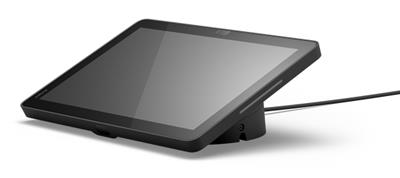
Jabra Control IP, ZR, Global
 Call our sales team
Jabra Control IP and Jabra PanaCast Control — touch controllers for meeting rooms that use Jabra PanaCast video bars, network-connected and powered over PoE, the Control IP with a 10.1″ display and proximity sensors in UC, Microsoft Teams Rooms and Zoom Rooms versions, the PanaCast Control with a 10″ display and a PoE injector in the box.
10.1″ display, 1920 × 1200
Android 13
Teams Rooms and Zoom Rooms
PoE 802.3af power
2 proximity sensors
Table or wall, no extra parts
Order code | Controller | Platform version | For bar | Region |
|---|---|---|---|---|
8010-239 | Jabra Control IP | UC | PanaCast 40 VBS and PanaCast 50 VBS | Global |
8011-239 | Jabra Control IP | Microsoft Teams Rooms | PanaCast 40 VBS and PanaCast 50 VBS | Global |
8012-239 | Jabra Control IP (this product) | Zoom Rooms | PanaCast 40 VBS and PanaCast 50 VBS | Global |
8510-231 | Jabra PanaCast Control with PoE injector | UC | PanaCast 50 VBS | EMEA |
8510-237 | Jabra PanaCast Control with PoE injector | UC | PanaCast 50 VBS | UK/HK |
With the Control IP the code sets the platform version, 8010 is UC, 8011 Microsoft Teams Rooms and 8012 Zoom Rooms, and -239 is the only suffix. The PanaCast Control 8510 differs in the regional version of the power cable, -231 is EMEA, -237 UK/HK.
Key features
Control IP with a 10.1″ landscape touch display, 1920 × 1200 resolution
Android 13 and two proximity sensors for automatic wake-up
PoE IEEE 802.3af power, data and power over one Ethernet cable
Microsoft Teams Rooms and Zoom Rooms certification
Mounting on a table at an angle or on a wall without further accessories
PanaCast Control with a 10″ display, Ethernet with PoE and USB-C ports
Description
Running the room by touch from the table
The Jabra Control IP is a touch controller with a 10.1″ display at 1920 × 1200 on Android 13. It is designed for the PanaCast 40 VBS and PanaCast 50 VBS video bars and is included in the box of the PanaCast 40 VBS and PanaCast 55 VBS systems. On its own it is ordered in the UC, Microsoft Teams Rooms or Zoom Rooms version, and it is certified for Microsoft Teams Rooms and Zoom Rooms.
It wakes up when someone walks up to it
Two proximity sensors wake the controller automatically as soon as someone approaches. It stands on a table at an angle or hangs on a wall without further accessories, and the display angle is 0° or 25°. One Ethernet cable carries both data and power, as the controller is powered over PoE IEEE 802.3af.
PanaCast Control for the PanaCast 50 VBS
The Jabra PanaCast Control is a touch controller with a 10″ LCD display for the PanaCast 50 VBS bar, with Ethernet with PoE and USB-C ports. A PoE injector with a power cable is in the box, so it does not need a PoE switch. It shows its IP address on the display and is configured through a web browser.
Strengths and limits
Strengths
One cable for data and power
Automatic wake-up by proximity sensors
Table or wall mounting without further accessories
Microsoft Teams Rooms and Zoom Rooms certification
Limits and what to tell the customer
The Control IP needs PoE. An 802.3af switch or better with 15.4 W, otherwise the injector
14402-20.The Control IP platform version is set by the order code. Order the version for the platform of the room.
The Control IP is designed for the PanaCast 40 VBS and PanaCast 50 VBS. For another bar, check compatibility with us.
The PanaCast Control is designed for the PanaCast 50 VBS. For another bar, check compatibility with us.
The network must let the controller talk to the bar, that is UDP 13006 and TCP 50051.
⚑ atlantis note
Which code to order
For PanaCast 40 VBS bars without a controller, that is the 870x codes, order the Control IP in the version that matches the platform of the bar, 8010-239 for UC, 8011-239 for Microsoft Teams Rooms or 8012-239 for Zoom Rooms. The PanaCast Control 8510-231 is the controller for the PanaCast 50 VBS, for the Czech Republic in the EMEA version.
PoE belongs in the project
The Control IP needs 15.4 W from an 802.3af PoE switch or better. If the switch in the room has no PoE, add the injector 14402-20 and the Ethernet cable 14302-26. The PanaCast Control has an injector in the box.
Network rules in advance
The controller and the bar talk over the network on ports UDP 13006 and TCP 50051. If there is a firewall or a separate VLAN between them, send the ports to the customer's IT before installation. The Control IP supports IPv4, IPv6 and SCEP.
Which room it suits
Recommended use | running a meeting room with a Jabra PanaCast video bar |
|---|---|
Jabra Control IP | for the PanaCast 40 VBS and PanaCast 50 VBS, in the box of the PanaCast 40 VBS and PanaCast 55 VBS systems |
Jabra PanaCast Control | for the PanaCast 50 VBS |
Good fit
A room with a PanaCast 40 VBS bar ordered without a controller, a replacement or second controller for a room, a room with a PoE switch.
Verify
Which bar the controller belongs to and which platform the room runs. Whether PoE is available at the controller. Whether the network between the controller and the bar lets the required ports through. Whether the controller will sit on a table or on a wall.
Consider another model
The PanaCast 40 VBS 872x system or the PanaCast 55 VBS 8900-231, where the Control IP is already in the box. Jabra Scheduler where a booking panel outside the room is needed.
The "Verify" and "Consider another model" cards come from the experience of the atlantis team.
Compatibility and versions
Recommended
Jabra Control IP
Controller for the PanaCast 40 VBS and PanaCast 50 VBS in three platform versions. Microsoft Teams Rooms and Zoom Rooms certification.
UC
Microsoft Teams Rooms
Zoom Rooms
For PanaCast 50 VBS
Jabra PanaCast Control
A 10″ touch controller with a PoE injector in the box, UC version, for EMEA or UK/HK.
UC
PoE injector
In the system box
Control IP in the kit
The Control IP is part of the PanaCast 40 VBS systems with 872x codes and the PanaCast 55 VBS 8900-231, where it is not ordered separately.
PanaCast 40 VBS
PanaCast 55 VBS
Jabra Control IP
Display | 10.1″, landscape, 1920 × 1200 |
|---|---|
Display angle | 0° or 25° |
Operating system | Android 13 |
Sensors | 2 proximity sensors for automatic wake-up |
Certification | Microsoft Teams Rooms, Zoom Rooms |
Power | PoE IEEE 802.3af, 15.4 W from an 802.3af switch or better |
Network | IPv4, IPv6, SCEP |
Communication with the bar | UDP 13006, TCP 50051 |
Mounting | on a table at an angle or on a wall, without further accessories |
Security | Kensington lock |
For a mounting design we will confirm the Control IP dimensions and weight with your order.
Jabra PanaCast Control
Purpose | touch controller for the PanaCast 50 VBS |
|---|---|
Display | LCD touch screen, 10″ |
Ports | Ethernet with PoE, USB-C |
Power | PoE, injector and 1 m AC power cable in the box |
Management | IP address on the display, configuration through a web browser |
Table mounting | optional mount |
What is in the box
In the PanaCast Control box
PanaCast Control touch controller
PoE injector
AC power cable, 1 m
2× RJ45 Ethernet cable
Not included
Video bar
PoE switch
PanaCast Control table mount
14307-58
We will confirm the box contents of the Control IP 8010-239 to 8012-239 with your order.
Order alongside
PoE injector, EMEA14402-20
Powers the Control IP where the switch has no PoE.
Ethernet cable14302-26
RJ45, Cat5e, 4.57 m long, for the Control IP.
PanaCast Control table mount14307-58
Table grommet and stud, black.
Variants and the product range
Model | Type | Use |
|---|---|---|
Jabra Control IP ◂ this product | 10.1″ touch controller, PoE | running a room with the PanaCast 40 VBS and PanaCast 50 VBS |
Jabra PanaCast Control | 10″ touch controller, PoE injector in the box | running a room with the PanaCast 50 VBS |
Jabra Scheduler | 10.1″ booking panel with a light bar | room booking, mounted outside the room |
PanaCast 40 VBS, 872x system | video bar with the Control IP in the box | huddle room and small room |
PanaCast 55 VBS, 8900-231 system | video bar with the Control IP in the box | medium room |
What to check before ordering and deploying
Bar: which video bar the controller belongs to
Platform: for the Control IP the UC, Microsoft Teams Rooms or Zoom Rooms version, set by the code
Duplication: the PanaCast 40 VBS 872x and PanaCast 55 VBS
8900-231systems already have a controllerPoE: an 802.3af switch with 15.4 W, or the injector
14402-20Cable: Ethernet to the controller position, or
14302-26Network: ports UDP 13006 and TCP 50051 between the controller and the bar
Mounting: table or wall, for the PanaCast Control the table mount
14307-58Region: PanaCast Control for the Czech Republic in the EMEA version
8510-231Warranty+: ordered only together with the device, see Warranty
The atlantis team will help with every point. With controllers the usual questions are PoE and the network rules between the controller and the bar, and both are best agreed with the customer's IT before installation.
Management and services
Management follows the platform: in native mode the device is managed from the administration of the platform the room runs.
Jabra Plus: cloud management of Jabra meeting room devices, that is scheduled bulk firmware updates, configuration, status monitoring, remote restart and an inventory of devices and rooms. Support and the scope of management differ by model, so check both with us for the specific device and system.
atlantis services for partners
atlantis is a direct importer and distributor, and we deliver projects through a network of specialist partners. The services below are therefore offered to the partner, not to the end customer. The partner sets the scope. On one project we take on the whole delivery, on another we cover just the part the partner currently lacks capacity or specialisation for, and on a third the partner manages alone and uses us only for a consultation.
Before the decision: a consultation on choosing the system and a comparison of the suitable options. The recommendation is built on the size and the character of the room, that is light, acoustics, shape, seating layout and furnishing, then on headcount and on how meetings are actually run there. We offer a live demonstration at our premises, which the partner can bring their customer to, and where it is warranted a test installation, that is a proof of concept.
Delivery and installation: transport, professional mounting and the work that goes with it, that is cabling, installation material, brackets and room alterations. We handle the installation in full, or support the partner's own team where needed.
Network readiness and security: we advise on preparing the network for the demands of two-way real-time video, that is throughput, latency and traffic prioritisation, and on securing the communication.
Configuration and integration: setting up the communication platform and the room account, connecting to the network, and advice on linking and integrating third-party software and hardware.
Training and documentation: training prepared to match the user's role, that is one thing for room users and another for administrators, plus preparation of both project and user documentation.
Service and support after the sale: our certified team in Czech, available to the partner throughout the equipment's life. We handle a warranty claim with the manufacturer on the partner's behalf.
Warranty
The product carries the standard Jabra warranty, and we will confirm its length for the specific order code with your order.
Included
Manufacturer's warranty
At its discretion the manufacturer repairs or replaces a faulty unit, or refunds the purchase price. We handle the claim with the manufacturer on the partner's behalf.
standard warranty
Extension
Jabra Warranty+
It extends the warranty period, not its scope, and starts when the standard warranty ends. It is bought only together with the device, at the time of purchase, and cannot be ordered later. The customer receives an e-mail confirmation from the manufacturer listing the serial numbers.
at purchase only
Take note
Wear parts
The warranty does not cover cables, ear cushions, head and neck bands, pouches, stands, power adapters and removable batteries. A part that stops working within 14 days of purchase is treated as faulty at purchase.
wear parts
14 days
Warranty+ order codes by length of extension. For PanaCast Control 1 year 851X-39891, 2 years 851X-39892, 3 years 851X-39893, 4 years 851X-39894; for Control IP 1 year 801X-39891, 2 years 801X-39892, 3 years 801X-39893. It is ordered in the same order as the device.
FAQ
What is the difference between the Control IP and the PanaCast Control?
The Jabra Control IP is a controller with a 10.1″ display on Android 13, with proximity sensors and in three platform versions, designed for the PanaCast 40 VBS and PanaCast 50 VBS. The Jabra PanaCast Control is a controller with a 10″ display for the PanaCast 50 VBS, with a PoE injector in the box.
How do the UC, Microsoft Teams Rooms and Zoom Rooms versions differ?
The Jabra Control IP is ordered in the version for the platform the room will run, 8010-239 for UC, 8011-239 for Microsoft Teams Rooms and 8012-239 for Zoom Rooms. Whether the version can be changed after purchase we will confirm with your order.
How is the controller powered?
The Jabra Control IP is powered over PoE IEEE 802.3af and needs 15.4 W from an 802.3af switch or better, otherwise the injector 14402-20. The Jabra PanaCast Control has a PoE injector with a power cable in the box.
Do I need a controller when ordering a PanaCast 40 VBS or 55 VBS system?
The Jabra Control IP is in the box of the PanaCast 40 VBS systems with 872x codes and of the PanaCast 55 VBS 8900-231, so do not order it separately there. It is ordered separately for PanaCast 40 VBS bars without a controller, that is the 870x codes.
Does the controller need a mount?
The Jabra Control IP stands on a table at an angle or hangs on a wall without further accessories. For the Jabra PanaCast Control there is the optional table mount 14307-58.
Which ports must the network allow?
The Jabra Control IP talks to the bar on ports UDP 13006 and TCP 50051. If there is a firewall between the controller and the bar, these ports have to be allowed.
- Manufacturer
- Jabra
- Weight
- 0.848 kg
No attachments available.
Not sure what to choose?
We're happy to help you choose!
Every business day from 8:00 to 17:00