
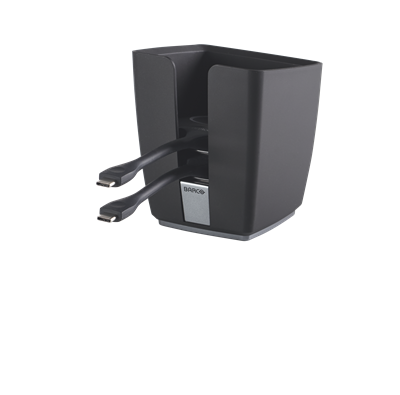
Barco ClickShare CX Buttons&Tray Bundle USB-C
 Call our sales team
ClickShare Button 4th generation and tray — a Button with a USB-C connector that plugs into a laptop and shares its content wirelessly to ClickShare C-5, C-10, CX-20, CX-30, CX-50 and Bar. Alongside it, a tray where the Buttons are kept. Rooms with ClickShare Hub use a different Button generation.
USB-C connector
Wi-Fi 2.4 and 5 GHz
FHD image at 30 fps
For C, CX and Bar
Does not work with ClickShare Hub
Revision 4.1: firmware 2.12.0.12+ on C and CX
Tray for up to 4 Buttons
Order code | What it contains | When to choose it |
|---|---|---|
R9861600D01C | 1× ClickShare Button 4th generation | a Button for the C-5, more presenters with the C-10, CX and Bar, a replacement for a lost unit |
R9861600P01C | 2× ClickShare Button 4th generation and 1× tray for 4th generation Buttons (this product) | equipping a room with two Buttons and a place to keep them |
R9861500T01 | 1× ClickShare tray for up to 4 Buttons | a tray for Buttons the customer already has; we will confirm availability with the order |
The Button and the pack with a tray also exist in a US variant with the US suffix. For the EU, order the codes without that suffix, exactly as in the table.
Key features
USB-C connector, USB power 5 V DC, 350 mA typical, 500 mA maximum
Wi-Fi IEEE 802.11 a/b/g/n/ac in the 2.4 and 5 GHz bands
Image from the Button in FHD 1920 × 1080 at 30 fps
WPA2-PSK in stand-alone mode, WPA2-PSK or IEEE 802.1X in network mode
Works with 8 Base Units: Bar Core, Bar Pro, C-5, C-10, CX-20, CX-30, CX-50 and CX-50 2nd generation
Revision 4.1 requires Base Unit firmware 2.12.0.12 or later on the C and CX ranges
Dimensions 14.6 × 59.3 × 161.39 mm, weight 60 g
The
R9861500T01tray holds up to 4 Buttons, weight 460 g
Description
A Button for the laptop
The ClickShare Button 4th generation plugs into the USB-C port of a Windows or macOS laptop, draws its power from it and sends content wirelessly to the Base Unit in the room, the image in FHD 1920 × 1080 at 30 fps. It communicates over Wi-Fi in the 2.4 and 5 GHz bands. In stand-alone mode it uses WPA2-PSK, when integrated into a corporate network WPA2-PSK or IEEE 802.1X. Button firmware updates automatically over Wi-Fi.
Which Base Units it belongs to
The 4th generation Button works with ClickShare Bar Core, Bar Pro, C-5, C-10, CX-20, CX-30, CX-50 and CX-50 2nd generation. The newer revision of the 4th generation Button (4.1) requires Base Unit firmware 2.12.0.12 or later on the C and CX ranges, so update the firmware before pairing. The ClickShare C-5 Gen2 and C-10 Gen2 work with 4th generation Buttons, not with the 5th generation. The 4th generation Button does not work with ClickShare Hub Core and Hub Pro; the Hub uses the 5th generation Button R9861700D01C.
The tray and the pack with a tray
The R9861600P01C pack contains two 4th generation Buttons and one tray for 4th generation Buttons, so everything for a room with two presenters in one code. The stand-alone ClickShare tray R9861500T01 holds up to four Buttons, has a base diameter of 80 mm and a height of 132 mm and weighs 460 g. We will confirm its availability with the order.
Pairing and installation
Before use the Button is paired with the Base Unit in the room. When the security level on the Base Unit changes, the Buttons have to be paired again. Our installation also covers configuration, network connection and control, that is pairing the Buttons with the Base Unit, checking the firmware and setting the network mode.
Strengths and limits
Strengths
One Button code for the current C, CX and Bar ranges
Powered from the laptop's USB, no adapter of its own
Firmware updates automatically over Wi-Fi
Two Buttons and a tray in one code
R9861600P01C
Limits and what to tell the customer
It does not work with ClickShare Hub Core and Hub Pro. Those take the 5th generation Button
R9861700D01C.Revision 4.1 needs Base Unit firmware 2.12.0.12 or later on the C and CX ranges. We will confirm which revision ships with the order, so update the firmware before pairing.
The image from the Button is FHD 1920 × 1080 at 30 fps.
The laptop needs a USB-C port and Windows or macOS. Mobile devices share through the ClickShare app.
A change of security level on the Base Unit means pairing all Buttons again.
We will confirm availability of the stand-alone tray
R9861500T01with the order.
⚑ atlantis note
Which code to order
The single Button is R9861600D01C, typically for the ClickShare C-5 Gen2 R9861605EU, which ships without a Button, or as a replacement. For a new room with two presenters the pack R9861600P01C with two Buttons and a tray is more practical. The stand-alone tray R9861500T01 makes sense for Buttons the customer already has.
The Hub uses another Button generation
The 4th generation Button does not work with ClickShare Hub Core or Hub Pro, and the 5th generation Button R9861700D01C in turn does not work with the C, CX and Bar ranges. Before ordering, always make sure which device the Button is for.
Base Unit firmware first
The newer revision of the 4th generation Button (4.1) requires Base Unit firmware 2.12.0.12 or later on the C and CX ranges. The revision can only be told by the model number CSBTN004 on the back. When installing Buttons in an older room, check the version in the Configurator and update if needed, and only then pair the Buttons.
Set the security level before pairing
A change of security level on the Base Unit requires pairing the Buttons again. Agree the level with the customer before the room handover, so pairing does not have to be repeated for every Button.
Which device it belongs to
Place in the portfolio | ClickShare accessory for sharing from a laptop, and a tray for Buttons |
|---|---|
Compatible Base Units | Bar Core, Bar Pro, C-5, C-10, CX-20, CX-30, CX-50, CX-50 2nd generation |
Base Unit firmware | 2.12.0.12 or later for revision 4.1 on the C and CX ranges |
Not compatible | ClickShare Hub Core and Hub Pro |
Laptop | Windows or macOS, USB-C port |
Suitable
Adding a Button to the ClickShare C-5 Gen2, which ships without one. More presenters with the C-10, CX and Bar. Replacing a lost or damaged Button. A tray where Buttons tend to go missing after meetings.
Check
Which Base Unit is in the room and which firmware version it runs. Whether it is a ClickShare Hub. How many Buttons the room needs. Whether the laptops have a USB-C port. Whether the Base Unit runs on a corporate network with IEEE 802.1X.
Consider another model
For ClickShare Hub Core and Hub Pro the 5th generation Button R9861700D01C. For mobile devices the ClickShare app instead of a Button.
The “Check” and “Consider another model” fields come from the practice of the atlantis team.
Compatibility with Base Units
Base Unit | 4th generation Button | Note |
|---|---|---|
ClickShare C-5 and C-10 | yes | the 2nd generation works with 4th generation Buttons, not with the 5th generation; revision 4.1 requires firmware 2.12.0.12 or later |
ClickShare CX-20 and CX-30 | yes | revision 4.1 requires firmware 2.12.0.12 or later |
ClickShare CX-50 and CX-50 2nd generation | yes | revision 4.1 only with the CX-50 2nd generation and firmware 2.12.0.12 or later |
ClickShare Bar Core and Bar Pro | yes | video bar with ClickShare |
ClickShare Hub Core and Hub Pro | no | 5th generation Button |
Conversely, the 5th generation Button does not work with the C, CX or Bar ranges. The Button generation is therefore chosen by the Base Unit, not by the laptop.
Technical data
Generation | 4th generation |
|---|---|
Connector | USB-C, USB 2.0 interface |
Wi-Fi | IEEE 802.11 a/b/g/n/ac, 2.4 and 5 GHz |
Authentication | WPA2-PSK stand-alone, WPA2-PSK or IEEE 802.1X in network mode |
Image from the Button | FHD 1920 × 1080 at 30 fps |
Power | from USB, 5 V DC, 350 mA typical, 500 mA maximum |
Dimensions | 14.6 × 59.3 × 161.39 mm |
Weight | 60 g |
Laptop operating system | Windows and macOS |
Firmware update | automatic over Wi-Fi |
Capacity | up to 4 Buttons |
|---|---|
Dimensions | base diameter 80 mm, height 132 mm, top width 124.1 mm |
Weight | 460 g |
Availability | we will confirm with the order |
The tray dimensions and weight apply to the stand-alone code R9861500T01. The tray in the R9861600P01C pack is a tray for 4th generation Buttons.
What is in the box
What the code includes
R9861600D01C: one ClickShare Button 4th generationR9861600P01C: two ClickShare Buttons 4th generation and one tray for 4th generation ButtonsR9861500T01: one ClickShare tray
Not included
A Base Unit
Buttons with the stand-alone tray
R9861500T01The 5th generation Button for ClickShare Hub, which has code
R9861700D01C
Order alongside
Another 4th generation ButtonR9861600D01C
For each additional presenter in the room or as a spare for a lost unit.
Two Buttons with a trayR9861600P01C
Two 4th generation Buttons and a tray in one code, for a new room with two presenters.
Stand-alone trayR9861500T01
A tray for up to four Buttons, for Buttons the customer already has. We will confirm availability with the order.
5th generation Button for ClickShare HubR9861700D01C
Only for ClickShare Hub Core and Hub Pro. It does not work with the C, CX or Bar ranges.
Variants and the product range
Product | For which device | How it differs |
|---|---|---|
ClickShare Button 4th generation | C-5, C-10, CX-20, CX-30, CX-50, CX-50 2nd generation, Bar Core, Bar Pro | USB-C, Wi-Fi 2.4 and 5 GHz, FHD image at 30 fps |
Pack of two Buttons with a tray | the same devices as the 4th generation Button | two Buttons and a tray in one code |
ClickShare tray | ClickShare Buttons | up to 4 Buttons, availability confirmed with the order |
ClickShare Button 5th generation | ClickShare Hub Core and Hub Pro only | USB-C, Wi-Fi 2.4, 5 and 6 GHz, WPA3-SAE |
What to check before ordering and deployment
Base Unit: Bar Core, Bar Pro, C-5, C-10, CX-20, CX-30, CX-50 or CX-50 2nd generation
Not a Hub: ClickShare Hub Core and Hub Pro take the 5th generation Button
R9861700D01CFirmware: on the C and CX ranges update the Base Unit to 2.12.0.12 or later, revision 4.1 requires it
Quantity: how many Buttons the room needs; the C-5 has none in the box
Laptops: a USB-C port and Windows or macOS
Network: stand-alone mode with WPA2-PSK, or a corporate network with IEEE 802.1X
Security: set the level before pairing, a change means pairing again
Tray: the
R9861600P01Cpack, or the stand-aloneR9861500T01with availability confirmed
The atlantis team will help with every point. From determining the right Button generation and checking firmware to pairing the Buttons and handing over the room.
Management and services
Managed through the base unit: accessories are not managed on their own. The ClickShare device they belong to is managed, through XMS Cloud.
ClickShare Buttons: they update automatically over Wi-Fi.
atlantis services for partners
atlantis is a direct importer and distributor, and we deliver projects through a network of specialist partners. The services below are therefore offered to the partner, not to the end customer. The partner sets the scope. On one project we take on the whole delivery, on another we cover just the part the partner currently lacks capacity or specialisation for, and on a third the partner manages alone and uses us only for a consultation.
Before the decision: a consultation on choosing the system and a comparison of the suitable options. The recommendation is built on the size and the character of the room, that is light, acoustics, shape, seating layout and furnishing, then on headcount and on how meetings are actually run there. We offer a live demonstration at our premises, which the partner can bring their customer to, and where it is warranted a test installation, that is a proof of concept.
Delivery and installation: transport, professional mounting and the work that goes with it, that is cabling, installation material, brackets and room alterations. We handle the installation in full, or support the partner's own team where needed.
Network readiness and security: we advise on preparing the network for the demands of two-way real-time video, that is throughput, latency and traffic prioritisation, and on securing the communication.
Configuration and integration: setting up the communication platform and the room account, connecting to the network, and advice on linking and integrating third-party software and hardware.
Training and documentation: training prepared to match the user's role, that is one thing for room users and another for administrators, plus preparation of both project and user documentation.
Service and support after the sale: our certified team in Czech, available to the partner throughout the equipment's life. We handle a warranty claim with the manufacturer on the partner's behalf.
Warranty
ClickShare accessories have their own warranty terms, separate from the device they belong to. The five-year SmartCare coverage after registration applies to the base units of the C, CX and Bar ranges. We will confirm the warranty period for a specific part with your order.
FAQ
Does the 4th generation Button work with ClickShare Hub?
The ClickShare Button 4th generation R9861600D01C works with neither ClickShare Hub Core nor Hub Pro. The Hub uses the 5th generation Button R9861700D01C, which in turn does not work with the C, CX and Bar ranges.
What is the difference between codes R9861600D01C and R9861600P01C?
The ClickShare Button 4th generation is the same in both. R9861600D01C is one Button, R9861600P01C is two Buttons and one tray for 4th generation Buttons in one pack.
Does the Base Unit need a particular firmware?
The ClickShare Button 4th generation R9861600D01C exists in two revisions. The newer revision 4.1, model CSBTN004, requires Base Unit firmware 2.12.0.12 or later on the C and CX ranges. It is good practice to check the version and update if needed before pairing the Buttons.
At what resolution does the Button send the image?
The ClickShare Button 4th generation R9861600D01C sends the image in FHD 1920 × 1080 at 30 fps over Wi-Fi in the 2.4 and 5 GHz bands.
How many Buttons does the tray hold?
The ClickShare tray R9861500T01 holds up to four Buttons, and we will confirm its availability with the order. For a new room the R9861600P01C pack with two Buttons and a tray is more practical. The ClickShare Hub Pro and Control Panel kit includes the ClickShare 2-in-1 Tray R9861700T01, which holds both 4th and 5th generation Buttons.
How does the Button update?
The ClickShare Button 4th generation R9861600D01C updates its firmware automatically over Wi-Fi. The Base Unit has automatic update switched on by default once connected to the network, and can also be updated manually in the Configurator or in bulk in XMS Cloud.
What happens to the Buttons when the security level changes?
The ClickShare Button 4th generation R9861600D01C has to be paired again after the security level on the Base Unit changes. The Base Unit has three predefined levels and the default is level 1.
- Manufacturer
- Barco
- Weight
- 0.06 kg
No attachments available.
Not sure what to choose?
We're happy to help you choose!
Every business day from 8:00 to 17:00