
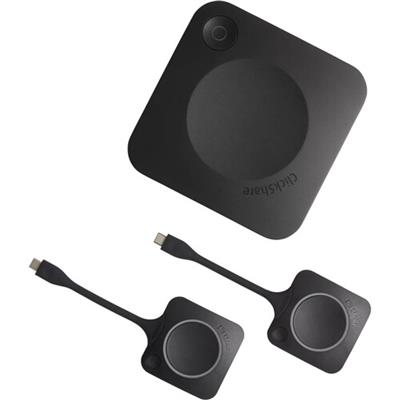
Barco ClickShare CX-30 set GEN2
 Call our sales team
ClickShare CX-20 Gen2, CX-30 Gen2 and CX-50 2nd generation — Barco wireless conferencing systems for the BYOM model. The user plugs a ClickShare Button with a USB-C connector into the laptop, presses it, and the laptop starts using the room's display, camera, microphone and speaker wirelessly. The video call itself runs in the application the user has on the laptop, for example Microsoft Teams, Zoom, Google Meet or Webex.
Wireless conferencing, BYOM
ClickShare Button 4th generation, USB-C
4K output, at 60 Hz on the CX-50 Gen2
Two displays only on the CX-50 Gen2
AirPlay, Google Cast, Miracast
Button range up to 30 m
SmartCare: 5 years coverage after registration
Order code | Model and set contents | When to choose it |
|---|---|---|
R9861612EUB1 | ClickShare CX-20 Gen2, EU version, 1× ClickShare Button | a small meeting room or huddle space, one source on screen |
R9861613EUB2 | ClickShare CX-30 Gen2, EU version, 2× ClickShare Button (this product) | a small to medium meeting room, two sources at once, touchback and annotation |
R9861622EUB2 | ClickShare CX-50 2nd generation, EU version, 2× ClickShare Button | a boardroom or a room with higher demands, two displays, wired laptop connection over USB-C |
The EU suffix stands for the regional version, B1 and B2 for the number of Buttons in the box. The second generation of the CX-20 and CX-30 is recognised by a code starting with R98616.
Key features
Once the Button is connected, the laptop uses the room's camera, microphone and speaker as its own peripherals
4K UHD 3840 × 2160 output, at 30 Hz on the CX-20 Gen2 and CX-30 Gen2, at 60 Hz on the CX-50 Gen2
One source on screen on the CX-20 Gen2, two sources at once on the CX-30 Gen2 and CX-50 Gen2
Two displays on the CX-50 Gen2, one over HDMI and the other over the rear USB-C
Sharing without a Button too, over AirPlay, Google Cast, Miracast and the ClickShare App for computer and mobile
Range between Button and Base Unit up to 30 m
1 Gbit network on the CX-20 Gen2 and CX-30 Gen2, 2.5 Gbit on the CX-50 Gen2
Three security levels and XMS Cloud cloud management
Description
One press turns a laptop into a meeting room
The camera and the speakerphone connect over USB to the Base Unit. When the user plugs the ClickShare Button into the laptop and presses it, the laptop sees the room's camera and speakerphone as its own peripherals and the image goes wirelessly to the display. Audio from the laptop also goes to the Base Unit's audio output. The call therefore runs in whichever application the user has on the laptop, and the room adapts to the user, not the other way round.
Three models by room
ClickShare CX-20 Gen2 is the entry model for small meeting rooms and huddle spaces, with one Button and one source on screen. ClickShare CX-30 Gen2 is for small to medium meeting rooms, has two Buttons, shows two sources at once and adds touchback, annotation and a blackboard. The second generation of the CX-20 and CX-30 brought USB 3.0 ports, DisplayPort over USB-C and USB-C power with Power Delivery; otherwise their functions match the first generation.
CX-50 2nd generation for the boardroom
ClickShare CX-50 2nd generation is the model for rooms with higher demands and boardrooms. It drives two displays, so people and content can sit side by side, and handles 4K output at 60 Hz. The front USB-C port serves as a wired content input with DisplayPort Alt Mode in 4K at 30 Hz, that is a Wired RoomDock, and with the R9861581 converter as an HDMI input too. It has a 2.5 Gbit network, audio output over a 3.5 mm jack and an ANSSI CSPN certificate for the configuration of Base Unit, Button and Desktop App for Windows. It also complies with ETSI EN 303 645.
Installation, network and security
The Base Unit is managed through the web Configurator and the XMS Cloud platform. Security has three predefined levels; the default is level 1 and changing it requires the Buttons to be paired again. Wi-Fi works with WPA2-PSK in stand-alone mode and with WPA2-PSK or IEEE 802.1X in network integration mode, on the CX-50 Gen2 with the EAP-TLS, EAP-TTLS and PEAP methods. Our installation also covers configuration, network connection and control.
Strengths and limits
Strengths
The user calls from the application they know, Microsoft Teams, Zoom, Google Meet or Webex
A guest can share without a Button too, over AirPlay, Google Cast, Miracast or the ClickShare App
The CX-20 Gen2 and CX-30 Gen2 can be powered and connected with one USB-C cable from a display with Power Delivery
XMS Cloud management is part of the free SmartCare service package
Limits and what to tell the customer
One camera and one speakerphone. One USB camera and one speakerphone with echo cancellation can be connected; the Base Unit does not support a separate microphone or a separate speaker.
Only the CX-50 Gen2 does two displays. The CX-20 Gen2 and CX-30 Gen2 drive one display.
The CX-20 Gen2 shows only one source and has no touchback, annotation or blackboard.
The ClickShare Button 5th generation
R9861700D01Cdoes not work with the CX range. Only 4th generation Buttons are compatible.The EU version is region-locked and the Base Unit does not work outside its region.
The standard warranty is 1 year. The 5 years coverage applies only after registration through SmartCare within the first year.
The CX-50 Gen2 cannot be ceiling mounted and the screws for wall mounting are not in the box.
⚑ atlantis note
Which code to order
For a small meeting room where one person presents, R9861612EUB1 is enough. Where two presenters alternate or two pieces of content should be shown side by side, choose R9861613EUB2. For a boardroom with two displays, a wired laptop connection or an HDMI input, R9861622EUB2 belongs in the quote.
Order only 4th generation Buttons
For the CX range order an extra Button with code R9861600D01C, or the set of two Buttons with a tray, R9861600P01C. The ClickShare Button 5th generation R9861700D01C belongs to the ClickShare Hub range and does not work with CX. The newer revision of the 4th generation Button (4.1) requires Base Unit firmware 2.12.0.12 or later, so update the firmware before pairing.
Register SmartCare at installation
The customer gets the 5 years coverage only if the Base Unit is registered in their name and added to XMS Cloud within the first year of the standard warranty. The safest way is to register straight away at installation; SmartCare is free and has no order code.
Camera and audio belong in the quote
The Base Unit has no camera or microphone of its own. The quote therefore needs one USB camera and one USB speakerphone with echo cancellation. The Base Unit does not support a set of separate microphones and speakers.
HDMI input on the CX-50 Gen2 only with the R9861581 converter
The front USB-C port of the CX-50 Gen2 becomes an HDMI input with the R9861581 converter. The "DisplayPort over USB-C" option must be switched on in the Configurator, and firmware 2.19 or later suits the Wired RoomDock. Other HDMI to USB-C converters are not supported.
Button 4.1 and older laptops
The Button revision 4.1 (model CSBTN004) draws over 500 mA and may restart on older USB 2.0 laptop ports. For users with an older laptop we recommend a USB 3.0 or USB-C port.
Which room it suits
ClickShare CX-20 Gen2 | small meeting rooms and huddle spaces |
|---|---|
ClickShare CX-30 Gen2 | small to medium meeting rooms |
ClickShare CX-50 2nd generation | rooms with higher demands and boardrooms |
Place in the portfolio | a wireless conferencing system for the BYOM model, the call runs in the laptop application |
Good fit
A meeting room where people call from their own laptop and each company or team uses a different platform. An environment with changing guests who need to share quickly. A boardroom with two displays and a requirement for a wired connection, which calls for the CX-50 Gen2.
Verify
How many people will present at once and whether touchback and annotation are needed. How many displays the room has and whether they offer USB-C with Power Delivery of at least 65 W. Which USB camera and speakerphone the customer plans. Whether IT requires 802.1X. Where the Base Unit will sit and how it will be mounted.
Consider another model
ClickShare C-5 or C-10 where wireless presentation without conferencing is enough. ClickShare Bar Core or Bar Pro where camera and audio should come in one video bar. ClickShare Hub Core or Hub Pro where the customer wants a Microsoft Teams Rooms system.
The "Verify" and "Consider another model" cards come from the experience of the atlantis team.
Platforms and modes
Recommended
Wireless conferencing with the Button
The Button in the laptop links the video call application with the room's camera, microphone, speaker and display. The platform is whichever one the user has on the laptop.
Microsoft Teams
Zoom
Google Meet
Webex
Without a Button
Native sharing and the app
Content can be shared without a Button too, through native protocols or the ClickShare App for Windows, macOS, iOS and Android. The app supports Windows 10 and later, macOS 11 and later, Android 11 and later and iOS 14 and later.
AirPlay
Google Cast
Miracast
ClickShare App
CX-50 Gen2 only
Wired over USB-C
The front USB-C port of the CX-50 Gen2 takes content from a laptop by cable with DisplayPort Alt Mode in 4K at 30 Hz. With the R9861581 converter it works as an HDMI input.
Wired RoomDock
HDMI with R9861581
Image and displays
Parameter | CX-20 Gen2 | CX-30 Gen2 | CX-50 Gen2 |
|---|---|---|---|
Output resolution | 4K UHD 3840 × 2160 at 30 Hz | 4K UHD 3840 × 2160 at 30 Hz | 4K UHD 3840 × 2160 at 60 Hz |
Video outputs | HDMI 1.4b or USB-C DisplayPort 1.2 | HDMI 1.4b or USB-C DisplayPort 1.2 | HDMI 2.1 and rear USB-C with DisplayPort Alt Mode |
Number of displays | 1 | 1 | 2 |
Video input | none | none | front USB-C, DisplayPort Alt Mode, 4K at 30 Hz |
Sources on screen at once | 1 | 2 | 2 |
Touchback, annotation, blackboard | no | yes | yes |
Native protocols | AirPlay, Google Cast, Miracast | AirPlay, Google Cast, Miracast | AirPlay, Google Cast, Miracast |
ClickShare App | for computer and mobile | for computer and mobile | for computer and mobile |
Ports, network and security
Parameter | CX-20 Gen2 | CX-30 Gen2 | CX-50 Gen2 |
|---|---|---|---|
USB ports | front 1× USB-C 3.0 and 1× USB-A 3.0 | front 1× USB-C 3.0 and 1× USB-A 3.0 | front 1× USB-C; rear 1× USB-C and 2× USB-A, USB 3.0 |
USB use | USB camera, USB speakerphone, touch display | USB camera, USB speakerphone, touch display | rear USB-A for peripherals, rear USB-C as video output, front USB-C as content input |
Audio output | USB, HDMI | USB, HDMI | USB, 3.5 mm jack, HDMI |
LAN | 1× 1 Gbit | 1× 1 Gbit | 1× 2.5 Gbit |
Wi-Fi | IEEE 802.11 a/g/n/ac, 2.4 and 5 GHz (DFS) | IEEE 802.11 a/g/n/ac, 2.4 and 5 GHz (DFS) | IEEE 802.11 a/g/n/ac, 2.4 and 5 GHz (DFS) |
Button to Base Unit range | up to 30 m | up to 30 m | up to 30 m |
Wi-Fi security | WPA2-PSK stand-alone, WPA2-PSK or IEEE 802.1X | WPA2-PSK stand-alone, WPA2-PSK or IEEE 802.1X | WPA2-PSK, 802.1X (EAP-TLS, EAP-TTLS, PEAP) |
Certification | FCC, CE | FCC, CE | FCC, CE, ANSSI CSPN |
Management | XMS Cloud | XMS Cloud | XMS Cloud |
Client operating system | Windows 10+, macOS 11+, Android 11+, iOS 14+ | Windows 10+, macOS 11+, Android 11+, iOS 14+ | Windows 10 20H2+, macOS; recommended Intel i5 or Apple M3 and 8 GB RAM |
Security has three predefined levels; the default is level 1. After a level change the Buttons have to be paired again.
Power and mounting
Parameter | CX-20 Gen2 | CX-30 Gen2 | CX-50 Gen2 |
|---|---|---|---|
Power | 110/220 V adapter, or USB-C from a display with Power Delivery of at least 65 W | 110/220 V adapter, or USB-C from a display with Power Delivery of at least 65 W | 19 V DC, 4.74 A adapter |
Power consumption | operation 5 to 10 W, max. 24 W | operation 5 to 10 W, max. 24 W | max. 50 W |
Dimensions H × W × D | 34 × 135 × 135 mm | 34 × 135 × 135 mm | 39 × 200 × 202 mm |
Weight | 900 g | 900 g | 900 g |
Noise | max. 25 dBA at 0 to 30 °C, 30 dBA at 30 to 40 °C | max. 25 dBA at 0 to 30 °C, 30 dBA at 30 to 40 °C | max. 25 dBA at 0 to 30 °C, 30 dBA at 30 to 40 °C |
Operating temperature | 0 to +40 °C | 0 to +40 °C | 0 to +40 °C |
Mounting | table; mounting base in the box for table, wall or ceiling, with adhesive or screws; behind-display bracket optional | table; mounting base in the box for table, wall or ceiling, with adhesive or screws; behind-display bracket optional | table, or wall without a bracket: 2 holes 162 mm apart, screw head max. 6.5 mm; no ceiling |
Theft protection | Kensington lock | Kensington lock | Kensington lock |
Compatible Buttons | 4th generation, revisions 4.0 and 4.1 | 4th generation, revisions 4.0 and 4.1 | 4th generation, revisions 4.0 and 4.1 |
Use only the Barco adapter supplied in the box or as a spare part. The replacement adapter for the CX-20 Gen2 and CX-30 Gen2 is B563182K, for the CX-50 Gen2 B5631051K.
What is in the box
In the box
ClickShare CX-20 Gen2, CX-30 Gen2 or CX-50 Gen2 Base Unit
ClickShare Button 4th generation with USB-C, 1 on the CX-20 Gen2, 2 on the CX-30 Gen2 and CX-50 Gen2
Power adapter, on the CX-50 Gen2 a DC adapter with a regional cable
Mounting base on the CX-20 Gen2 and CX-30 Gen2
Printed safety manual on the CX-50 Gen2
Not included
USB camera and USB speakerphone
A display
A behind-display bracket
Screws for wall mounting the CX-50 Gen2
The HDMI to USB-C converter
R9861581Extra Buttons
R9861600D01C
Order alongside
ClickShare Button 4th generationR9861600D01C
One Button with USB-C for another presenter or as a replacement. Wi-Fi 2.4 and 5 GHz, Full HD image at 30 frames per second, weight 60 g. Do not confuse with the 5th generation Button R9861700D01C, which does not work with CX.
Two Buttons with a trayR9861600P01C
A set of two 4th generation Buttons and a Button tray. It suits a room where the Buttons should go back to one place.
Mounting baseB573071K
A replacement or extra base for the CX-20 and CX-30, for table, wall or ceiling mounting. One is already in the box.
Replacement adapter for the CX-20 and CX-30B563182K
A 12 V DC, 2 A adapter. It does not fit the CX-50 Gen2.
Replacement adapter for the CX-50 Gen2B5631051K
A 19 V DC, 4.74 A adapter, only for the ClickShare CX-50 2nd generation.
HDMI to USB-C converter for the CX-50 Gen2R9861581
Turns the front USB-C port of the CX-50 Gen2 into an HDMI input. It is not intended for the CX-20 Gen2 and CX-30 Gen2.
Variants and the product range
Model | Type | Button | Intended for |
|---|---|---|---|
ClickShare C-5, C-10 | wireless presentation | 4th generation | content sharing without conferencing |
ClickShare CX-20 Gen2 | wireless conferencing | 4th generation, 1 in the box | small meeting rooms and huddle spaces |
ClickShare CX-30 Gen2 | wireless conferencing | 4th generation, 2 in the box | small to medium meeting rooms |
ClickShare CX-50 2nd generation | wireless conferencing | 4th generation, 2 in the box | rooms with higher demands and boardrooms |
ClickShare Bar Core, Bar Pro | video bar with ClickShare | 4th generation | a room where camera and audio should come in one device |
ClickShare Hub Core, Hub Pro | Microsoft Teams Rooms system | 5th generation | a room with its own Teams Rooms system, requires a Microsoft Teams Rooms licence |
What to check before ordering and deploying
Model: how many people will present at once and whether touchback, annotation and a blackboard are needed
Displays: one or two; only the CX-50 Gen2 drives two displays
Camera and audio: one USB camera and one USB speakerphone with echo cancellation
Power: an adapter, or on the CX-20 Gen2 and CX-30 Gen2 USB-C from a display with Power Delivery of at least 65 W
Buttons: number by presenters, 4th generation only; for revision 4.1 Base Unit firmware 2.12.0.12 or later
Network: a LAN socket at the Base Unit, an IT requirement for 802.1X and the choice of security level
Mounting: table, wall or ceiling; the CX-50 Gen2 cannot go on the ceiling and the screws are not in the box
Wired connection: on the CX-50 Gen2 input over USB-C, for HDMI the
R9861581converterRegion: the EU version works only in its region
SmartCare: registration in the customer's name and addition to XMS Cloud within the first year
The atlantis team will help with every point. From choosing the model, camera and speakerphone through mounting, configuration and network connection to SmartCare registration and user training.
Management and services
XMS Cloud: Barco's cloud platform for remote management, monitoring and analytics of ClickShare devices. It is part of the SmartCare service, so the customer does not buy it separately.
Firmware updates: once connected to the network, the device updates itself by default. Bulk and scheduled updates are run from XMS Cloud, and a single device can be updated manually through its ClickShare Configurator web interface. ClickShare Buttons update automatically over Wi-Fi.
Security levels: devices of the C and CX ranges and ClickShare Bar Pro have three predefined security levels, level 1 is the default. Changing the level means pairing the Buttons again, so we recommend setting it right at installation.
atlantis services for partners
atlantis is a direct importer and distributor, and we deliver projects through a network of specialist partners. The services below are therefore offered to the partner, not to the end customer. The partner sets the scope. On one project we take on the whole delivery, on another we cover just the part the partner currently lacks capacity or specialisation for, and on a third the partner manages alone and uses us only for a consultation.
Before the decision: a consultation on choosing the system and a comparison of the suitable options. The recommendation is built on the size and the character of the room, that is light, acoustics, shape, seating layout and furnishing, then on headcount and on how meetings are actually run there. We offer a live demonstration at our premises, which the partner can bring their customer to, and where it is warranted a test installation, that is a proof of concept.
Delivery and installation: transport, professional mounting and the work that goes with it, that is cabling, installation material, brackets and room alterations. We handle the installation in full, or support the partner's own team where needed.
Network readiness and security: we advise on preparing the network for the demands of two-way real-time video, that is throughput, latency and traffic prioritisation, and on securing the communication.
Configuration and integration: setting up the communication platform and the room account, connecting to the network, and advice on linking and integrating third-party software and hardware.
Training and documentation: training prepared to match the user's role, that is one thing for room users and another for administrators, plus preparation of both project and user documentation.
Service and support after the sale: our certified team in Czech, available to the partner throughout the equipment's life. We handle a warranty claim with the manufacturer on the partner's behalf.
Warranty
The standard Barco warranty on the ClickShare C, CX and Bar ranges is 1 year. Once the device is registered through SmartCare, coverage extends to 5 years.
Included
1-year warranty
The manufacturer's standard warranty on the device, valid without any further step.
1 year
SmartCare
5 years of coverage after registration
SmartCare is a free service package included in the price of the device. It covers swift hardware replacement in case of a fault, support from Barco and partners, and five years of access to data and analytics in XMS Cloud. It is activated by registering the device to the end customer and adding it to XMS Cloud.
5 years
free of charge
Take note
Register within the first year
Registration must take place within the one-year standard warranty. Without it, only the one year remains. We recommend registering the device right at installation, and we will help with it.
register in year 1
FAQ
What is the difference between the CX-20, CX-30 and CX-50?
The ClickShare CX-20 Gen2 R9861612EUB1 has one Button, shows one source and is for small meeting rooms. The ClickShare CX-30 Gen2 R9861613EUB2 has two Buttons, shows two sources at once and adds touchback, annotation and a blackboard. The ClickShare CX-50 2nd generation R9861622EUB2 adds two displays, 4K output at 60 Hz, a wired input over USB-C and a 2.5 Gbit network.
Does the 5th generation Button work with the CX range?
The ClickShare CX-20 Gen2, CX-30 Gen2 and CX-50 2nd generation do not work with the 5th generation Button R9861700D01C, which belongs to the ClickShare Hub range. Order the 4th generation Button R9861600D01C or the R9861600P01C set. The newer revision of the 4th generation Button (4.1) requires Base Unit firmware 2.12.0.12 or later, so update the firmware before pairing.
Which platform does the video call run on?
ClickShare CX has no platform of its own; the call runs in the laptop application, for example Microsoft Teams, Zoom, Google Meet or Webex. This applies to R9861612EUB1, R9861613EUB2 and R9861622EUB2 alike. A customer who wants a Microsoft Teams Rooms system chooses the ClickShare Hub Core or Hub Pro.
Which camera and microphone can be connected?
ClickShare CX supports one USB camera and one USB speakerphone with echo cancellation. The Base Unit does not support a separate microphone or a separate speaker. This applies to R9861612EUB1, R9861613EUB2 and R9861622EUB2, and neither the camera nor the speakerphone is in the box.
Can the system drive two displays?
The ClickShare CX-50 2nd generation R9861622EUB2 can, one display over HDMI and the other over the rear USB-C. The ClickShare CX-20 Gen2 R9861612EUB1 and CX-30 Gen2 R9861613EUB2 drive one display, over HDMI or USB-C.
Can a laptop be connected by cable?
The ClickShare CX-50 2nd generation R9861622EUB2 has a front USB-C port as a wired content input in 4K at 30 Hz. With the R9861581 converter it works as an HDMI input; "DisplayPort over USB-C" must be switched on in the Configurator. The CX-20 Gen2 and CX-30 Gen2 have no video input.
How long is the warranty?
The ClickShare CX-20 Gen2, CX-30 Gen2 and CX-50 2nd generation come with a 1 year standard warranty and 5 years coverage after registration through SmartCare. Registration must be done within the first year, in the end customer's name and with the device added to XMS Cloud. This applies to R9861612EUB1, R9861613EUB2 and R9861622EUB2.
- Manufacturer
- Barco
- Weight
- 0.9 kg
No attachments available.
Not sure what to choose?
We're happy to help you choose!
Every business day from 8:00 to 17:00